Live editing and document rooms
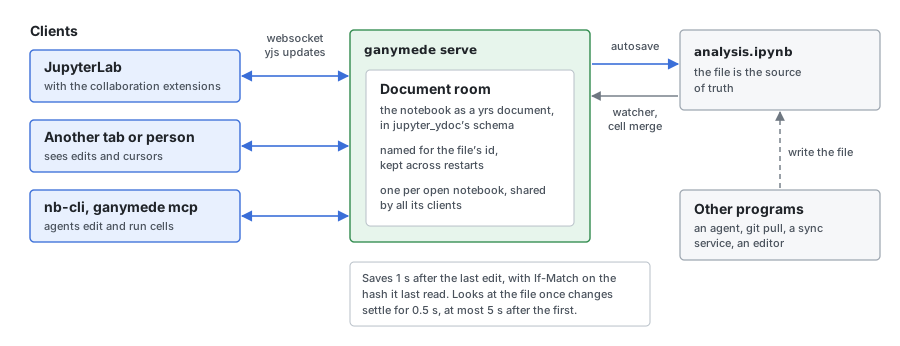
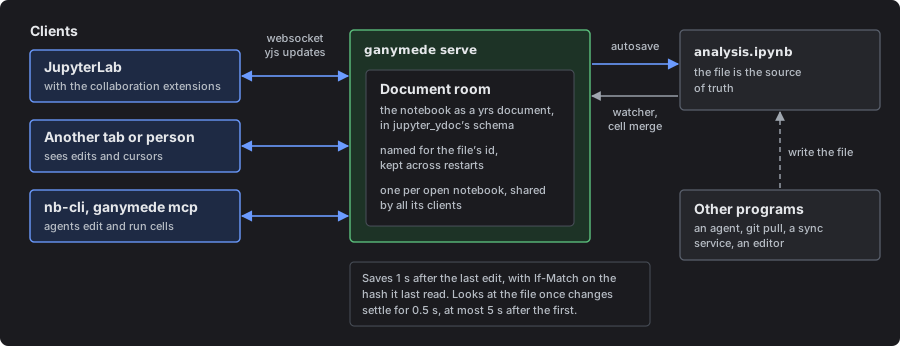
A document room is a notebook held live in the server, so that several clients edit it at once and see each other's edits as they type: two JupyterLab tabs, two people, or a person and an agent. The file on disk stays the source of truth. The room loads it, saves to it, and takes in changes other programs make to it.
Ganymede speaks the same protocol as jupyter-collaboration, so JupyterLab's collaboration extensions work unchanged, and nb-cli and ganymede mcp edit and run notebooks through rooms too.
Turn it on in JupyterLab
Install the collaboration extensions into the JupyterLab that Ganymede serves:
ganymede lab extension install jupyter-docprovider jupyter-collaboration-uiFrom then on JupyterLab opens notebooks through rooms: open the same notebook in two tabs, or share the server with a second person, and each sees the other's edits and cursor. Without the extensions JupyterLab reads and writes the file per request, as with jupyter_server on its own.
How the room and the file stay in step
The room keeps the notebook as a yrs document (the Rust port of Yjs), in the schema jupyter_ydoc and JupyterLab's @jupyter/ydoc share. It autosaves a second after the last edit, with an If-Match on the hash it last read, so it never overwrites a change it hasn't seen.
The room watches its file's directory (inotify, FSEvents, or Windows' change notifications; elsewhere it polls every second) and takes in changes other programs make: an agent, git pull, a sync service, an editor. It looks once events have settled for half a second, and at most five seconds after the first unsettled event, so a file that a program rewrites constantly still reaches the room.
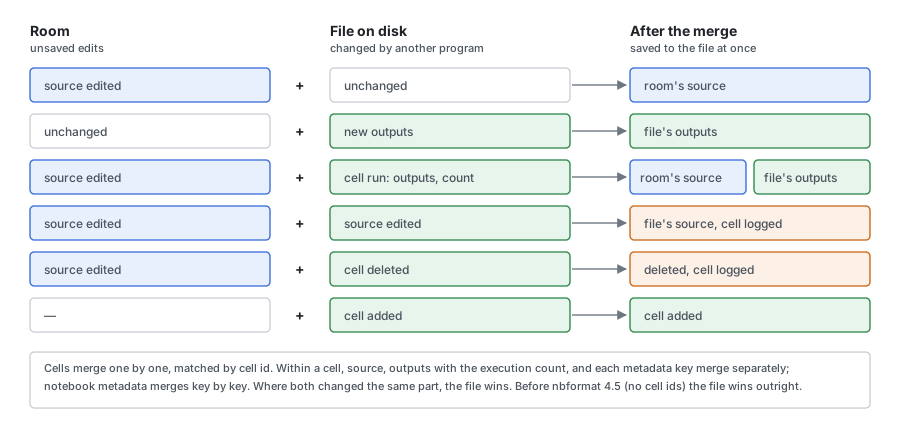
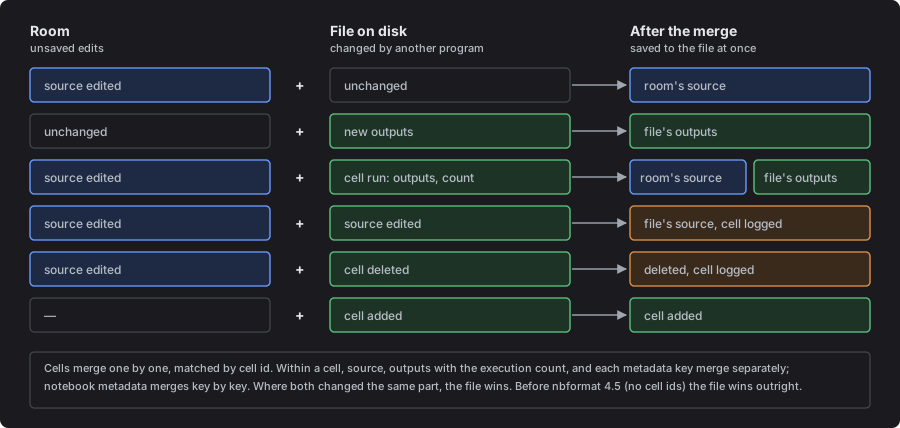
A change that arrives while the room has unsaved edits is merged, cell by cell:
- The room keeps its edits and takes the other program's changes to other cells, and the cells it added or deleted.
- Within a cell both changed, the source, the outputs with the execution count, and each metadata key merge separately. A source edit in the room survives an agent running that cell on disk.
- Where both changed the same part, or one deleted a cell the other changed, the file on disk wins that part, and the server logs the cell.
- Notebook metadata merges key by key the same way.
- Notebooks older than nbformat 4.5 have no cell ids, so for them the file wins outright, as in
jupyter-collaboration.
After taking in a change from the file, the room saves its own edits at once. A client's explicit save whose merge lets the file win a cell the room had changed (by any client, or by execution outputs) saves the merge and answers failed, since that change isn't in the file.
A delete through the contents API closes the room's clients with code 4404, the code a reconnect gets for the dropped file, and the room doesn't write the file back.
Trust
The room signs the notebook when it saves it, as jupyter_server signs a notebook a frontend saves with every cell trusted, so it opens trusted next time. A code cell's outputs are trusted when they came from a run on this server: through the execute endpoint or ganymede mcp, or written by a client running the cell. Outputs read from a file nobody signed, when the room opened it or merged it in from disk, are not: the notebook stays unsigned until each of those cells runs again through the server, or someone trusts the notebook (ganymede trust, or Trust Notebook in a frontend), which holds with the room open. A client that writes back the very outputs the unsigned file had doesn't make them trusted.
Connections
The server pings each room's websocket every 30 seconds and drops a client it hasn't heard from, not even a pong, for 90 seconds, so a connection left half-open by a sleeping laptop or a lost network doesn't keep its room open. A client that falls 10,000 messages behind, or max_body_size bytes of messages behind, is closed with code 1008: each client holds its own copy of what it hasn't read, and the kernel channels drop output past that point, but a room can't skip an update; a close the room sends (4404 for a deleted file) still reaches it. A message larger than max_body_size closes the socket. A write to a client may take 30 seconds plus one more for every 64 KiB, and a write that long counts as hearing from the client, so a large notebook's first sync gets through a slow link. A client reconnects and resyncs as after any drop.
File ids
A room is named for its file's id, not its path. Ids are kept in ganymede_file_ids.db in the Jupyter data dir, so a client keeps its room across a server restart. A rename or delete through the contents API moves or drops the id, and a room open on a renamed file follows it. A file moved by another program gets a new id. When another program deletes or moves a file with an open room, the room closes its clients with 4404, as for a delete through the API. If the database can't be read or written, ids handed out meanwhile are kept in memory and resolve until the server stops.
POST /api/fileid/index?path= gives a file's id, as jupyter-server-documents does.
Running cells into a room
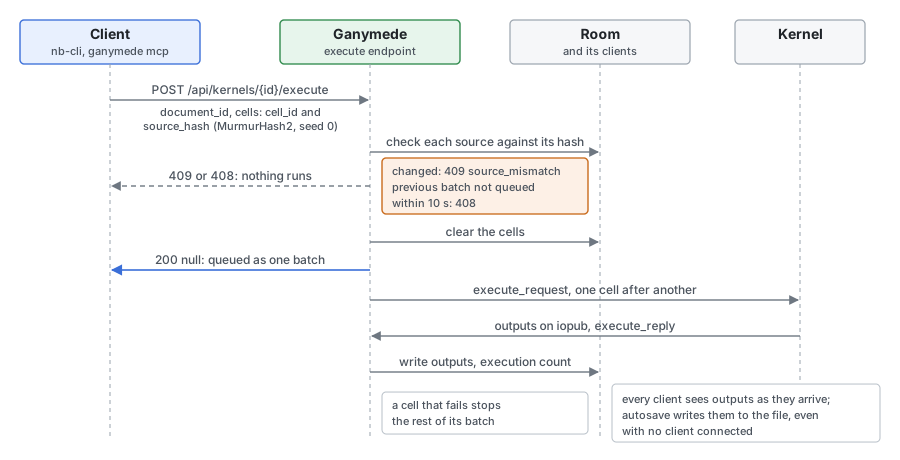
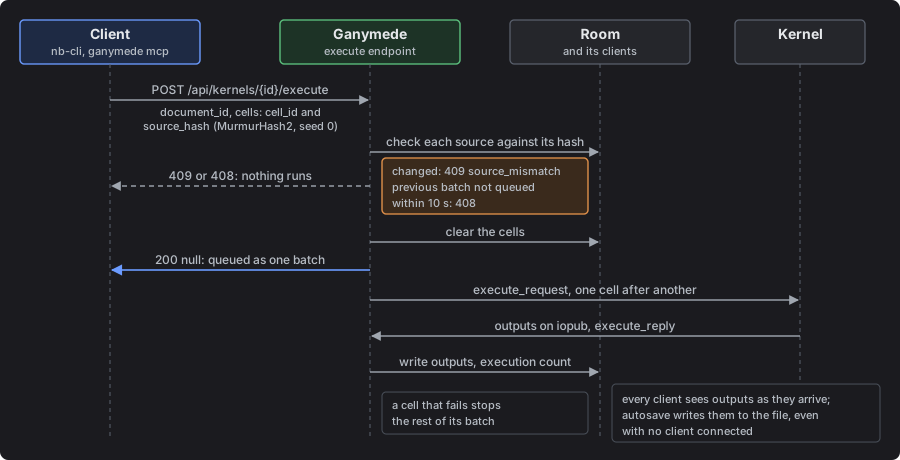
The server can run cells and write their outputs into the room itself, with jupyter-server-documents' execute endpoint. The outputs reach every client as they arrive, and reach the file with no client connected. This is how nb-cli's remote mode and ganymede mcp run cells.
POST /api/kernels/{kernel_id}/execute{"document_id": "json:notebook:<file id>",
"cells": [{"cell_id": "...", "source_hash": "<MurmurHash2 of the source, seed 0>"}],
"request_id": "...", "previous_request_id": "..."}The server checks each cell's source against its hash, clears the cells, queues them as one batch, and answers 200 null. It answers 409 {"error": "source_mismatch", "cell_id"} if a cell changed since the client hashed it, and 408 if previous_request_id wasn't queued within ten seconds. A cell that fails stops the rest of its batch.
Waiting for the cells
Ganymede adds an optional wait field, in seconds (at most 3600), for clients that can't follow the room, such as the apps' Shortcuts actions. With it, the server answers once the batch has run or the time is up, with each requested cell as the room has it, before the room saves:
{"finished": true, "cells": [{"cell_type": "code", "id": "...", "execution_count": 1, "outputs": [...], "...": "..."}]}finished is false when the time ran out; the cells keep running and the reply shows them as they were. Without wait, the answer is 200 null, as in jupyter-server-documents.
Two servers on one notebook
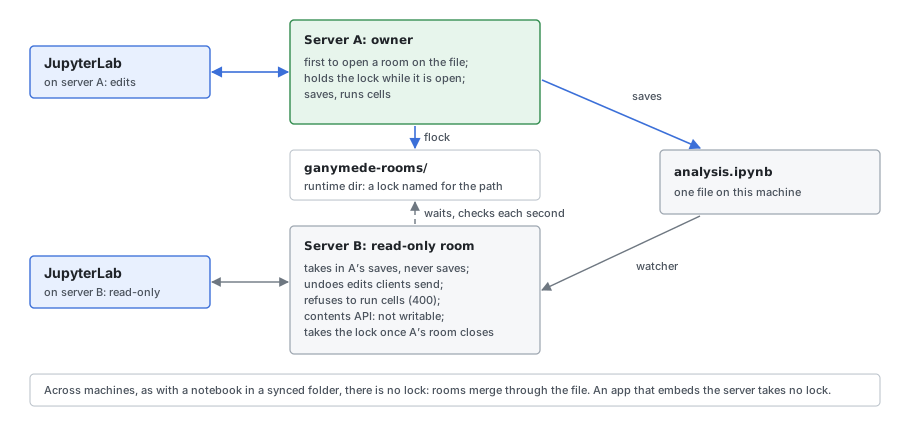
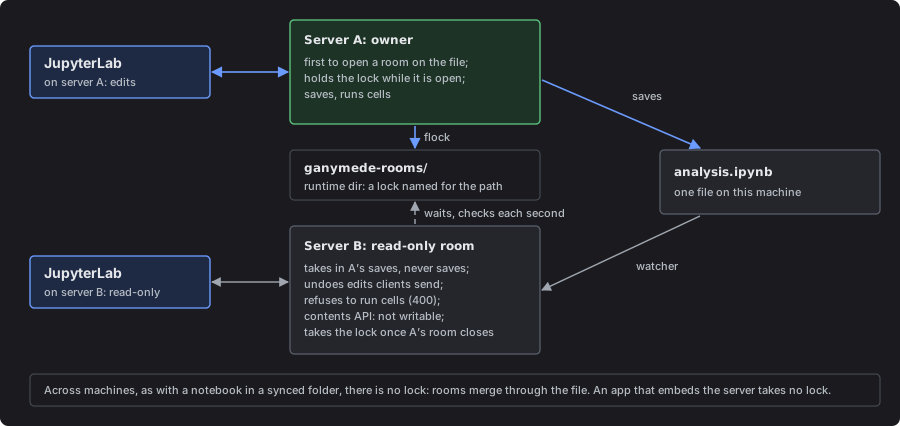
On one machine, the first server to open a room on a notebook owns it while the room is open: it holds a lock in the Jupyter runtime dir's ganymede-rooms/, named for the file's path (flock, or LockFileEx on Windows). Another server's room on the same file is read-only. Its contents API reports the notebook as not writable, which JupyterLab shows as read-only. The room takes in the owner's saves, never saves, and undoes any edit a client sends, for every client. It also refuses to run cells (POST /api/kernels/<id>/execute answers 400, and the MCP run tools return an error), since their outputs would never be saved. Once the owner's room closes or its server exits, the other room takes the lock within a second and saves its own edits from then on.
A room that was writable and finds another server owns its file now (after a rename, or once the file is reachable by a path another server locked) saves its edits before it turns read-only.
Across machines, as with a notebook in a synced folder, there is no lock, and rooms merge through the file as described above. An app that embeds the server takes no lock.
Limits
- Notebooks only: a text file opened collaboratively fails to load.
- No forking, timeline or chat.
- Frontends that don't open notebooks through a room see a change made on disk only the next time they open the notebook (Known gaps).
The iPad use case explains why the file, not the room, is the source of truth.