Other kernels
Ganymede has no language of its own. It starts whatever kernels are installed, from the same kernelspecs jupyter_server reads, so any Jupyter kernel works once its kernelspec is where Ganymede looks. Install sets up cdp-kernel for TypeScript; this page covers Python through ipykernel, then other kernels in brief.
Ganymede itself stays Python-free. Python is a kernel you choose to install, in an environment you manage, and nothing else on this page needs it.
Python (ipykernel)
ipykernel is the Python kernel JupyterLab and VS Code use. CI runs Ganymede's end-to-end suite against it (ipykernel 7.4) on Linux and macOS, alongside cdp-kernel.
The steps below set up one Python kernel for everything you open: a virtual environment kept only for the kernel, in a place you won't move or clean up, registered as python3. That name is the one most notebooks from elsewhere record, so they open on it without asking. A kernel per project covers kernels tied to one project's environment.
1. Make an environment for the kernel
Either way below makes the same environment at ~/.local/share/venvs/python3. Install the packages you want in every notebook the same way as ipykernel, now or later.
With uv (recommended)
uv manages Python environments and the Pythons they run on. If you don't have it, install uv first.
uv venv --managed-python ~/.local/share/venvs/python3
uv pip install --python ~/.local/share/venvs/python3 ipykernel
uv pip install --python ~/.local/share/venvs/python3 numpy pandas   # optional
--managed-python makes the environment use a Python that uv installs and keeps under its own data directory (~/.local/share/uv/python), downloading one the first time. Without it, uv venv takes the first Python it finds, which may be the system's or Homebrew's, and an OS or Homebrew upgrade can then remove that Python and break the kernel (see If the environment moves). uv's own Pythons change only when you ask:
uv python upgradeinstalls the latest patch release (3.14.6 to 3.14.7, say). The environment points at uv's directory for the minor version, so it picks up the patch without being made again.- A new minor version (3.15) is a separate install. The environment stays on the one it was made with until you make it again with
--python 3.15. uv python uninstallof the version the environment uses breaks it, as deleting any Python would.
To choose the version, add --python 3.13 (or another) to uv venv.
uv's environments have no pip of their own, so add packages with uv pip install --python ... as above.
With an existing Python and pip
python3 -m venv ~/.local/share/venvs/python3
~/.local/share/venvs/python3/bin/pip install ipykernel
~/.local/share/venvs/python3/bin/pip install numpy pandas   # optional
Jupyter itself (jupyter, notebook, jupyterlab) isn't needed; only ipykernel and what your code imports.
Don't install ipykernel into the system Python or Homebrew's. Most current systems refuse pip install there (PEP 668's "externally managed environment" error), and an OS or Homebrew upgrade can replace that Python under the kernel.
2. Register the kernelspec
Run ipykernel install with that environment's Python:
~/.local/share/venvs/python3/bin/python -m ipykernel install --user \
  --name python3 --display-name "Python 3"
--user writes kernels/python3/kernel.json into your user data directory (see How Ganymede finds kernels). Its argv names the environment's Python by absolute path, so the kernel runs in that environment from any directory, whatever is on PATH:
{
  "argv": ["/home/you/.local/share/venvs/python3/bin/python", "-Xfrozen_modules=off",
           "-m", "ipykernel_launcher", "-f", "{connection_file}"],
  "display_name": "Python 3",
  "language": "python",
  "metadata": { "debugger": true, "supported_encryption": ["curve"] },
  "kernel_protocol_version": "5.5"
}
--name is the name you pass to -k and the one notebooks record in metadata.kernelspec.name; it must match [a-z0-9._-]+.
3. Check that it runs
ganymede kernelspec list
ganymede run -k python3 'import sys; print(sys.executable); 6 * 7'
The list has a python3 line, and run prints the environment's Python path and 42. The kernel then shows in JupyterLab's launcher, VS Code's kernel picker, and the Mac app, as with any other kernelspec.
ipykernel 7 prints a warning on start that it is "running over TCP without encryption". Ganymede binds kernels to 127.0.0.1 and doesn't yet set up CurveZMQ (Known gaps); -q hides kernel stderr from ganymede run.
On Windows, interrupting an ipykernel cell doesn't work yet: ipykernel there waits for an event that jupyter_client sets up, and Ganymede supports signal and message interrupts only (Replacing Python).
If the environment moves
The kernelspec holds a path, not a copy of Python. If the environment is moved, renamed, or deleted, the kernel is still listed but won't start:
ganymede: starting kernel python3: io: spawning "/home/you/.local/share/venvs/python3/bin/python": No such file or directory (os error 2)A virtual environment also links to the Python it was made from, so removing or upgrading that Python (say, Homebrew moving from 3.13 to 3.14) breaks it the same way. Either way, make the environment again (step 1) and register it again (step 2); ipykernel install replaces the old spec of the same name.
A kernel per project
A project with its own environment, and package versions that should stay with it, can have its own kernel next to the global one. Register it from that environment under the project's name:
~/code/myproject/.venv/bin/python -m ipykernel install --user \
  --name myproject --display-name "Python (myproject)"
With conda, activate the environment first (conda activate myproject) and run python -m ipykernel install --user ... the same way.
Give each environment its own name. Without --name it is python3, and registering a project that way replaces the global kernel. The kernel lasts as long as the project's environment does, so remove it (below) when you delete the project.
For every user on the machine
Put the environment somewhere shared and register it under /usr/local, which Ganymede searches for every user:
sudo python3 -m venv /opt/venvs/python3
sudo /opt/venvs/python3/bin/pip install ipykernel
sudo /opt/venvs/python3/bin/python -m ipykernel install \
  --prefix /usr/local --name python3 --display-name "Python 3"
That writes /usr/local/share/jupyter/kernels/python3. A user's own python3 in their user data directory comes first and hides it.
A virtual environment's own kernelspec
pip install ipykernel also drops a python3 kernelspec inside the environment, at <venv>/share/jupyter/kernels/python3. jupyter_client finds it because it searches Python's sys.prefix; Ganymede doesn't, since it has no Python to ask. That spec's argv starts with plain python, which jupyter_client swaps for its own interpreter and Ganymede runs from PATH.
To use it anyway, add the directory as a root and put the environment's bin first on PATH, for example by activating it:
source ~/code/myproject/.venv/bin/activate
ganymede --kernelspec-root "$VIRTUAL_ENV/share/jupyter" run -k python3 '1 + 1'
With the environment inactive, python is whatever else is on PATH, and the kernel fails with No module named ipykernel_launcher. The ipykernel install --user steps above avoid both.
Remove it
ganymede kernelspec remove myprojectThis deletes the kernelspec directory, not the environment.
How Ganymede finds kernels
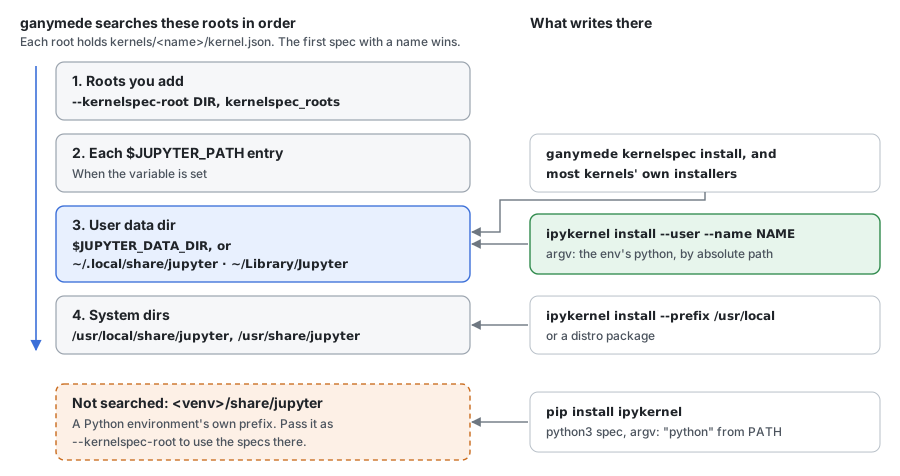
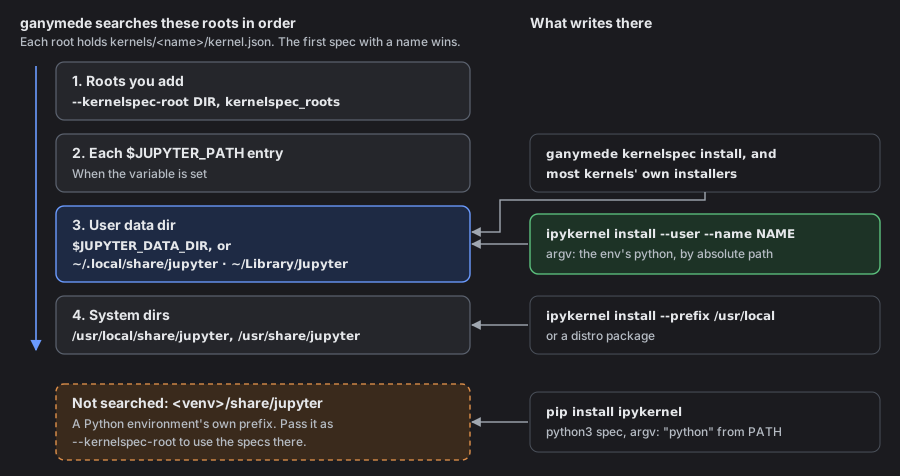
A kernelspec is a directory holding kernel.json (and optional logos). Ganymede reads <root>/kernels/<name>/kernel.json under each root, in this order:
- Each
--kernelspec-root DIR, orkernelspec_rootsinganymede.tomlfor the server. - Each entry of
$JUPYTER_PATH. - The user data directory:
$JUPYTER_DATA_DIRwhen set, otherwise~/.local/share/jupyter(or$XDG_DATA_HOME/jupyter) on Linux,~/Library/Jupyteron macOS,%APPDATA%\jupyteron Windows. /usr/local/share/jupyterand/usr/share/jupyter(%PROGRAMDATA%\jupyteron Windows).
This is jupyter_client's order without its sys.prefix root. Names are compared case-insensitively, and the first root with a name wins, so a python3 under --kernelspec-root hides one in the user directory. ganymede kernelspec paths prints the directories searched, and ganymede kernelspec list shows where each spec came from.
In each argv, Ganymede replaces {connection_file} with the file it writes for the kernel and {resource_dir} with the kernelspec's directory, and adds the spec's env to the kernel's environment. A bare command such as python or R is looked up on PATH, which for the Mac app is your login shell's.
In env values, $NAME and ${NAME} are replaced from Ganymede's environment, as jupyter_server does, so "PATH": "/opt/env/bin:${PATH}" puts a directory in front of PATH. $$ is a $, and a name that isn't set stays as written.
To install a kernelspec directory by hand, without the kernel's own installer:
ganymede kernelspec install path/to/spec --name NAMEIt copies the directory into the user data directory (--prefix PREFIX puts it under PREFIX/share/jupyter instead).
More kernels
Each kernel below ships its own kernelspec. Ganymede is tested on cdp-kernel and ipykernel only; the others speak the same protocol and should work, and a difference from jupyter_server is a bug worth reporting. Where an installer calls the jupyter command, which Ganymede doesn't need, use ganymede kernelspec install on the spec directory instead.
| Language | Kernel | Install the kernelspec |
|---|---|---|
| TypeScript, JavaScript | cdp-kernel | cdp-kernel install --runtime node (Install) |
| TypeScript, JavaScript | Deno | deno jupyter --install |
| R | IRkernel | IRkernel::installspec() calls jupyter; without it, ganymede kernelspec install "$(Rscript -e 'cat(system.file("kernelspec", package = "IRkernel"))')" --name ir |
| Julia | IJulia | using Pkg; Pkg.add("IJulia") writes a spec per Julia version |
| Rust | evcxr | cargo install --locked evcxr_jupyter && evcxr_jupyter --install |
| Go | gophernotes | go install, then copy its kernel directory in with ganymede kernelspec install |
| C++ | xeus-cpp | Conda package; its specs land in $CONDA_PREFIX/share/jupyter, so pass that as --kernelspec-root |
| Scala | Almond | The Almond launcher's --install |
The Jupyter project keeps a longer list of kernels.
If a kernel doesn't appear in ganymede kernelspec list, see Kernel not listed.