Architecture
Ganymede replaces one part of the Jupyter stack: the server in the middle, between the frontends people use and the kernels that run their code. The interfaces on both sides of that server stay as they are, so the frontends and kernels on either side don't change. This page shows the Jupyter architecture first, then where Ganymede sits in it, then how Ganymede is built inside.
The Jupyter architecture
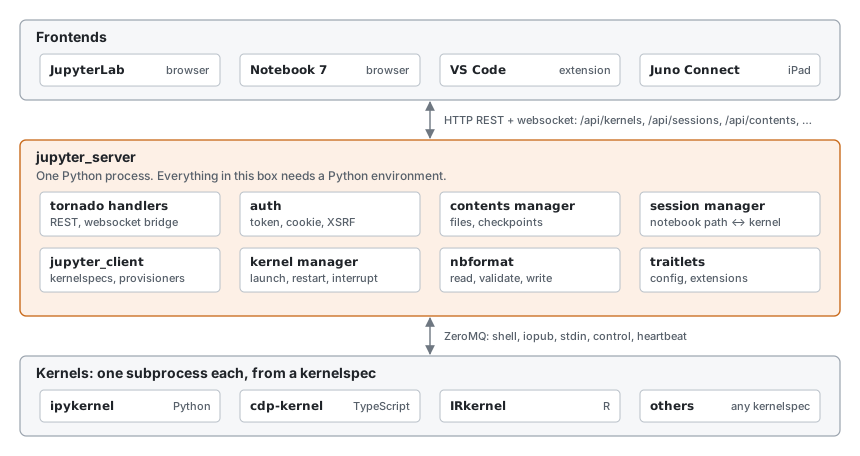
Jupyter is three layers joined by two protocols.
- Frontends show notebooks and send code to run: JupyterLab and Notebook 7 in a browser, the VS Code Jupyter extension, and other clients. They never talk to a kernel directly.
jupyter_serveris the process in the middle. It serves a REST API for kernels, sessions (which notebook uses which kernel), contents (files and checkpoints), and kernelspecs, and a websocket per kernel that carries protocol messages between frontends and the kernel. It handles auth, and serves the frontend's static files when the frontend is a web page.- Kernels run code in one language. Each is a separate process, launched from a kernelspec: a
kernel.jsonfile in a Jupyter data directory that gives the command line, display name, language, and interrupt mode. ipykernel is the Python kernel; cdp-kernel, IRkernel, and many others exist.
The two protocols are what make the layers replaceable:
- Between frontend and server, HTTP and websockets: the
jupyter_serverREST API, and two websocket framings of protocol messages (JSON, and the binaryv1.kernel.websocket.jupyter.org). - Between server and kernel, the Jupyter messaging protocol over ZeroMQ: five sockets per kernel (shell for requests, iopub for outputs and status broadcast to every client, stdin for
input(), control for interrupt and shutdown, heartbeat for liveness), each message signed with HMAC using a key from the kernel's connection file.
Inside jupyter_server, the work is split across Python packages: jupyter_client finds kernelspecs, launches kernels, and owns their sockets; nbformat reads, validates, and writes notebook files; traitlets carries configuration; and server extensions plug in more endpoints. nbclient (jupyter execute) runs notebooks headless on the same jupyter_client, without the server.
Nothing in the protocols requires Python. The server is where Python comes in: to run any notebook, even a TypeScript one, you install a Python environment for jupyter_server and jupyter_client.
Where Ganymede sits
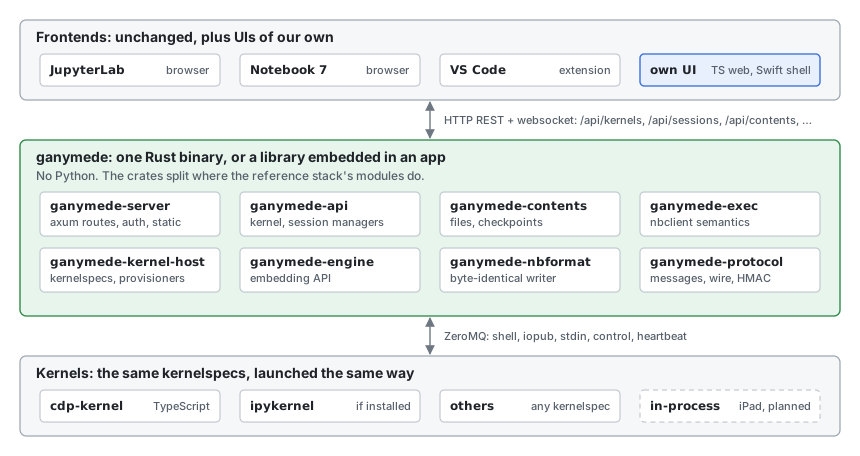
Ganymede takes the middle box's place and keeps both of its interfaces:
- Upward, it serves the
jupyter_serverREST and websocket API, so JupyterLab and VS Code connect to it unchanged. That API is a compatibility target: where Ganymede andjupyter_serverdiffer, the difference is a bug. UIs of Ganymede's own (a TypeScript web UI, or a Swift shell with a web view on iPadOS and macOS) are clients of the same API, outside the core. - Downward, it launches kernels from the same kernelspecs in the same data directories, and speaks the same messaging protocol over ZeroMQ. A kernel can't tell Ganymede from
jupyter_server.
What changes is everything inside the box. It is Rust, one binary or one library, with no Python environment behind it. Python is still welcome as a kernel: install ipykernel and its kernelspec, and Ganymede runs it like any other.
The headless executor moves inside too. ganymede execute produces the notebook jupyter execute would, from the same library the server is built on.
| Jupyter | Ganymede | Notes |
|---|---|---|
| Messaging protocol, wire format | ganymede-protocol | Unknown content fields pass through, so kernel extras reach clients. |
jupyter_client | ganymede-kernel-host | Kernelspecs, launch, the startup handshake, interrupt, shutdown, heartbeat. |
nbformat | ganymede-nbformat | The writer's output is byte-identical to Python's, so saves don't produce diffs. |
nbclient | ganymede-exec | The same outputs, display_id updates, timings, and error handling. |
| Contents manager | ganymede-contents | Atomic writes, modification-time conflict checks, checkpoints. |
| Kernel and session managers | ganymede-api | Independent of HTTP, so an in-app bridge can call it too. |
| tornado handlers, auth | ganymede-server | axum routes, token auth, origin checks, both websocket framings, JupyterLab's page and /lab/api/*. |
jupyter CLI | ganymede | kernelspec, run, console, execute, kernel, serve. |
| traitlets config | TOML config file | One file plus command-line flags. |
| Server extensions | none | Not compatible by design: they are Python. |
Inside Ganymede
The crates are layered so that each profile takes only what it needs. Lower crates know nothing of the ones above them.
| Crate | Depends on | What it is |
|---|---|---|
ganymede-protocol | none | Message types, the ZeroMQ multipart frame layout with HMAC, connection files, the websocket codecs. No I/O. |
ganymede-nbformat | none | nbformat 4.5 reading and writing. No I/O. |
ganymede-kernel-host | protocol | Kernelspec discovery; the KernelTransport seam (ZeroMQ, in-process); provisioners (subprocess, attach to a running kernel); the per-kernel session state machine. |
ganymede-exec | kernel-host, nbformat | Runs a notebook with nbclient's semantics. |
ganymede-engine | kernel-host, exec | The library to embed: find kernelspecs, start or attach to kernels, execute with streaming output, run notebooks. |
ganymede-contents | nbformat | The contents model over a filesystem. |
ganymede-api | kernel-host, contents | Kernel and session managers, response models, the per-client bridge, idle culling. No HTTP. Contents path validation confines kernel working directories to the root. |
ganymede-server | api, contents | The HTTP and websocket server. |
ganymede-cli | engine, server | The ganymede binary. |
ganymede-ffi | server | A C ABI (include/ganymede.h) that runs the server on loopback inside an app and returns its URL. A static library; scripts/build-xcframework.sh packages it for the Swift shell. |
Outside the Rust core, and outside this repository, the TypeScript for UIs that render in a web view lives in tlockney/ganymede-ui: its packages/client has protocol types, websocket codecs, a ServerConnection with injectable fetch and WebSocket, a REST client, and renderer and widget seams.
Seams
Each seam is a trait in Rust or an interface in TypeScript. The right column lists the implementations the profiles need, built or planned.
| Seam | What it abstracts | Implementations |
|---|---|---|
KernelTransport | A stream of channel messages to and from one kernel, with channel name, header, content, buffers | ZMQ (desktop, server); in-process channel (iPad local kernel); websocket client to another host (iPad to server, or any host proxying a remote host) |
Provisioner | How a kernel comes to exist | Local subprocess from a kernelspec; attach to an existing connection file or address; in-process (the app owns the kernel); remote, which proxies to another host's REST API as jupyter_server's gateway client does |
TransportFactory | How a launched kernel gets its KernelTransport, paired with its provisioner | ZMQ from the kernel's connection info (subprocess and attach); the app's own for an in-process kernel, which has no connection info (LaunchedKernel.connection is None) |
KernelspecSource | Where the list of launchable kernels comes from | Jupyter data dirs on the filesystem; extra roots from config, which is how conda and venv kernels get found without the host knowing what a venv is; an environment scanner as an optional module, as VS Code has; a static embedded list for the iPad (local kernel plus configured remotes) |
Contents | Files, directories, checkpoints | Local filesystem with atomic writes and mtime checks; Files app or iCloud container on iPad; passthrough to a remote host |
Auth | Who may call the API | None (in-app bridge); token; tailscale serve identity headers; later, an OIDC or Hub contract |
Frontend host | How a UI reaches the core | HTTP plus websocket (axum) on desktop and server; an in-app bridge on iPad that carries the same JSON shapes with no HTTP |
| UI (any language) | The client the user sees | Existing Jupyter frontends; a TS web UI; a Swift shell with a web view on iPad. Not a Rust module; the core only owes it the API |
Document | The live notebook model | File-as-truth with reload on external change; yrs CRDT with y-websocket for live multi-client sessions |
Renderer (TS) | One MIME type to DOM | Text, ANSI streams, HTML (sanitized or iframed), images, SVG, Markdown, LaTeX, JSON, Vega, Plotly, and a widget view |
WidgetManager (TS) | The jupyter.widget comm target | anywidget-only, small, enough for cdp-kernel; full @jupyter-widgets/base plus controls, needed when a Python kernel with ipywidgets runs. Choose per profile, not globally |
Editor (TS) | Code editing | CodeMirror 6, mode from language_info.codemirror_mode |
The server uses kernelspec dirs, subprocesses and ZMQ for KernelspecSource, Provisioner and TransportFactory unless an app embedding it passes its own in serve::Startup. Its subprocess and zmq features can then be turned off.
Two of these seams already exist in the ecosystem and should be matched rather than invented. On the server side, jupyter_server's gateway client is the remote provisioner. On the frontend side, @jupyterlab/services takes a ServerConnection with overridable fetch and WebSocket, which is exactly how JupyterLite points JupyterLab at an in-browser backend with no HTTP server. The iPad profile can use the same trick: the TS frontend in a web view, the core in Rust behind a message bridge that implements fetch and WebSocket. The shell around that web view is a Swift app; it can also call the core directly through an FFI layer (planned) for things the web view does not need to see.
One rule: the host knows no language
Every language-specific fact comes from the kernel: its kernelspec (language, metadata), its kernel_info_reply (language_info, extra fields), and the MIME types on its outputs. No code in the host crates depends on a kernel's language; outside tests, python appears there only where Python's output defines a file format (nbformat's float layout, the trust signature), in PyPI's names (where ganymede lab install gets JupyterLab), and in comments. The test suite runs the same scenarios against cdp-kernel and ipykernel, and both must pass.
Running a cell
- The frontend sends an
execute_requeston the kernel's websocket. ganymede-serverdecodes the frame and hands the message to the client's connection inganymede-api, which notes the client's session so replies find their way back.ganymede-kernel-hostsends it on the kernel's shell socket.- The kernel publishes
status: busy, then outputs (stream,display_data,execute_result,error) on iopub, which goes to every connected client, thenstatus: idle. Itsexecute_replycomes back on shell and goes only to the client that asked. - The request is complete when both the reply and the matching
idlehave arrived. They come on different sockets, in either order.
If the cell calls input(), the kernel sends an input_request on stdin to the client that ran the cell, which answers with an input_reply.
Kernel lifecycle
- Start. The host allocates ports, writes a connection file, and launches the kernelspec's command. It then sends
kernel_info_requeston shell and control until both answer and iopub has delivered a message. This handshake exists because ZeroMQ's PUB/SUB drops messages published before the subscriber connects. - Interrupt. A signal to the process group, or an
interrupt_requeston control, whichever the kernelspec'sinterrupt_modesays. - Restart and shutdown.
shutdown_requeston control, a grace period, then the process is killed. Restart launches the same kernelspec again under the same kernel id. - Idle culling. With
--cull-idle-secs, kernels idle that long with no clients are shut down.
Deployment profiles
The same crates compose differently per platform:
| Module | Server (homelab) | Desktop | iPad |
|---|---|---|---|
| Transport | ZMQ | ZMQ | In-process; websocket client to server |
| Provisioner | Subprocess, attach, remote | Subprocess, attach, remote | In-process, remote |
| Kernelspecs | Filesystem plus config roots | Filesystem plus config roots | Embedded list |
| Contents | Filesystem | Filesystem | Files app or iCloud container |
| Auth | Token or tailscale headers | Loopback token | None, in-app |
| Frontend host | HTTP | HTTP, or the core in-process in a native app | In-process bridge |
| UI | Any Jupyter client; optionally serves a TS bundle | Same, or a native shell with a web view | Swift shell with WKWebView for rendering |
| Document | File-as-truth; CRDT optional | File-as-truth | File-as-truth |
| Widget manager | Full, if Python kernels are expected | Full | anywidget-only |
| Kernels seen | cdp-kernel, python3, anything installed | Same | Local TS kernel, plus whatever the remote host lists |
The iPad profile has no ZMQ, no subprocesses, no HTTP server, and no Python. The server profile has all of them except Python, which arrives only as a kernelspec someone installed. The same crates, different feature flags and a different binary or app shell.
The engine already builds for iOS, Android, and wasm; the in-process kernel, the in-app bridge, and the app shells are planned. See the iPad use case.
Fitting the Jupyter ecosystem
In order of value per unit of work:
- Kernel compatibility. Protocol 5.x over ZMQ plus the kernelspec convention. Every existing kernel works: cdp-kernel, ipykernel, IRkernel, IJulia, evcxr, Deno, xeus. This is the core and is non-negotiable.
- File compatibility. nbformat 4.5 with faithful round-trip. Notebooks interchange with git, GitHub rendering, nbviewer, nbconvert run elsewhere, and every other client. Core.
- Tooling conventions. Jupyter data dirs, runtime dir and connection file naming,
JUPYTER_*environment variables. Cheap, and it meansjupyter console --existing, kernel installers, and environment tools all keep working around the host. - Client compatibility. The
jupyter_serverREST API and websocket subprotocols. JupyterLab, Notebook 7, VS Code, Juno Connect, and papermill-style tools connect. Medium cost; server and desktop profiles only. - Output and widget compatibility. The standard MIME types, comms, the
jupyter.widgetprotocol. anywidget-only is small; full ipywidgets is a dependency on the standard JS manager, taken only in profiles that expect Python kernels. - Debugger. DAP over the control channel, a DAP client in the UI. cdp-kernel and ipykernel both support it.
- Extensions. JupyterLab frontend extensions and
jupyter_serverextensions. Not compatible, by design.
Items 1 to 3 are what make "might also run Python" free: a Python kernel is just another kernelspec, and ipywidgets is just another widget manager module.
Further reading
- Replacing Python: each place the reference stack assumes Python, and what Ganymede does instead.
- Protocol and kernel host: what each component has to get right, and what is usually missed.
- User interfaces: what any notebook UI needs, and the UI options.
- Development log: findings from each step, including what JupyterLab and VS Code call and what broke.