An agent and a person in one notebook
Coding agents are good at exploratory analysis: pull a data set, slice it a few ways, join in other data, chart what changed. The work usually happens in the agent's shell, and when it's done someone asks for a write-up, which the agent reconstructs from memory. The code is cleaned up after the fact and may not be what ran, outputs are rerun or paraphrased, dead ends disappear, and nobody could watch or steer while it happened.
With Ganymede the agent keeps the notebook as it works. Each step runs as a cell on a real kernel and lands in a notebook you can watch live, rerun from the top, and hand to someone else:
- Every result came from the cell above it, on the notebook's kernel, and the outputs saved in the file are the real ones.
- Dead ends stay, labelled, and a finding that turns out wrong is revised in place, with the old text kept in the cell's metadata.
- You can watch in JupyterLab and add cells of your own; the agent sees what you changed the next time it reads the notebook.
- The finished notebook reruns from the top, and opens in any Jupyter tool.
Two journals from sessions on cdp-kernel, on Seattle's Fremont Bridge bike counts and on Oklahoma's earthquakes, are in the Examples, with the prompts that steered them.
How it works
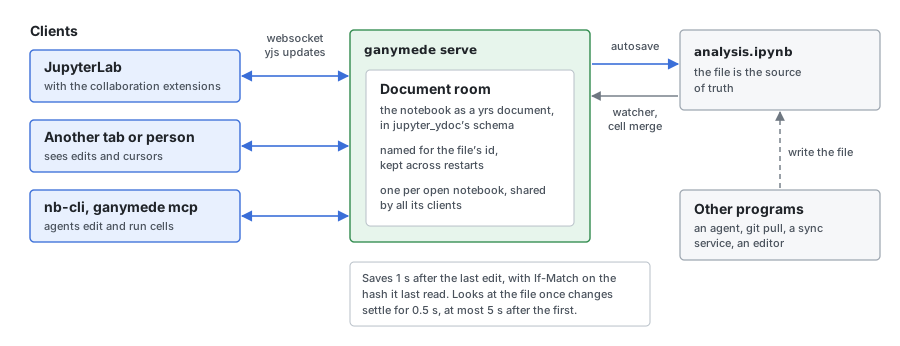
Agents and people edit the same live document. Three layers make that work, each built on a protocol the Jupyter ecosystem already speaks:
- Agent tools.
ganymede mcpis an MCP server over stdio. It joins a runningganymede serve --mcpwhose root holds the current directory, so a person watching sees the agent's work, and otherwise starts a server in its own process.serve --mcpalso serves the same tools over streamable HTTP. Agents over MCP has the setup and every tool; nb-cli, a notebook CLI for agents without MCP, works against the same server. - Document rooms. Each open notebook is a yrs CRDT in the format JupyterLab's real-time collaboration uses, and the server runs cells into the room with jupyter-server-documents' execute API, so outputs land even when no client is connected. Live editing and document rooms has the details.
- The file. The
.ipynbfile stays the source of truth: the room saves to it a second after each edit, and merges in changes from git, a sync service or an editor cell by cell.
Designed for how agents work
- Journal by executing.
cell_runadds a cell and runs it in one call, so the record and the computation can't drift apart. - Scratch probes.
record: falseruns code on the same kernel without adding a cell, so the agent can check a column name without cluttering the journal. - Honest about what ran where. A shell download or a query run elsewhere becomes a Markdown cell marked
recorded, never passed off as kernel output, and every agent cell carries provenance: who wrote it, how, and when. - Revise in place.
cell_editreplaces a cell, and withrun: truereruns it, keeping the replaced text in the cell's history. - A person in the loop.
notebook_readwithsincereturns only what a person added or changed since the agent's last read. - Output shaped for models. Results come back as compact text with terminal colours stripped and tracebacks trimmed; long output goes to a file, and SVG charts can be sent as images the agent can see.
- Show results in the chat.
cell_snapshotturns cells into Markdown with charts saved as images. - Build on earlier work.
notebooks_searchfinds what earlier journals concluded about the same data.
The journal plugin for Claude Code
One install bundles the MCP server with what makes a journal good: a skill with the conventions (a question as the title, a finding after each result, a clean run-all at the end), a reviewer agent that reads the notebook cold and reruns it, and hooks that tell the agent what you changed and stop it finishing while the journal has edits it hasn't rerun.
/plugin marketplace add tlockney/ganymede
/plugin install ganymede-journal@ganymede
Then ask for an analysis and say "keep a journal". The plugin has each part, and how to watch live in JupyterLab.
Your notebooks and the journal
You may ask the agent for part of an analysis and do the rest by hand in JupyterLab, VS Code or the apps. The skill treats your notebooks as part of the same work: it searches them along with earlier journals, adds to your notebook when that is where the work lives, matches your kernel and libraries, and shares code through modules both notebooks import rather than copied cells. The journal stays runnable in plain Jupyter.
The kernel a new journal starts is, in order: the one you ask for; the folder's default, kernel = "python3" in a .ganymede.toml in that folder or above; else one the agent infers from the project (CLAUDE.md, your notebooks nearby, pyproject.toml or package.json); else cdp-node.
In the apps
The Mac, iPad and iPhone apps open notebooks through rooms on a Ganymede server, including their own, so an agent's edits show as they happen (ganymede-ui#510).
These docs, for an agent
llms.txt indexes this site for an agent: every page in sidebar order, with its first sentence, linking the page's Markdown. Each page's Markdown is its URL plus .md, such as docs/install.md.