Agents over MCP
ganymede mcp gives a coding agent (Claude Code, Codex, Cursor, or any other MCP client) tools to open, edit and run notebooks. It is meant for journaling: the agent records an analysis in a notebook as it works, code with its output and notes on what each step found, instead of writing one up at the end. It needs no Python.
Set up
Add it as a stdio MCP server. For Claude Code:
claude mcp add ganymede -- ganymede mcpOther clients take the same command (ganymede mcp) in their MCP settings. Paths in the tools are relative to the connection's directory: the server's root, unless the section below applies.
Paths when the server's root is above the agent's folder
When ganymede mcp forwards to a running server rooted above the directory it started in (or --root-dir), that directory becomes the connection's own: the agent's a.ipynb is the file in its folder, and a leading / starts at the server's root. Paths in answers follow the same rule, so the agent can pass them back as they are. On a server rooted at /, such as the Mac app's, a leading / path is the file's absolute path. notebook_open names the folder. Clients that connect to /mcp themselves are unchanged: their paths start at the root.
ganymede mcp connects to a server in this order:
--server URL(with--tokenorJUPYTER_TOKEN).- A running
ganymede serve --mcpwhose root holds the current directory (or--root-dir), found by its server info file. Edits go through the server's document rooms, so they show live in JupyterLab (withjupyter-collaboration) or ganymede-ui while the agent works. - Otherwise, a server of its own in the same process, on a loopback port with a random token, rooted at the current directory. It stops, saving open notebooks, when the agent closes the connection.
Start a shared server with:
ganymede serve --mcp--mcp (config key mcp_enabled) serves the same tools over streamable HTTP at /mcp, behind the token, for clients that connect to a URL instead of starting a command.
A token for agents only
The server's token passes every route, so an agent that holds it can also write files, start kernels, open terminals and change grants over the REST API, whatever mcp_read_only or mcp_no_execute say. Give an agent mcp_token instead:
mcp_enabled = true
mcp_read_only = true
mcp_token = "a-long-random-string"
/mcp accepts it and no other route does: every REST and websocket route answers 403, and it sets no login cookie. /mcp takes the server's token too, so the page and ganymede mcp keep working, and the CLI's server info file keeps the server's token (the Mac app's differs; see Server info file). With auth off (an empty token) it adds nothing, since every route is open. A published page, from an agent or from the browser, replaces mcp_token as it does the server's token.
From ganymede-ui 0.11.0 on, the Mac app writes a server info file holding its mcp_token, which opens only /mcp.
mcp_token limits the agent only while it can't run code, with mcp_read_only or mcp_no_execute. A cell it runs can read the server's token from the server info file or the config, as any code in a kernel can, and an agent that only reads still sees the server's token if an output shows it (a printed URL with ?token=, say).
The ganymede-journal plugin for Claude Code
ganymede-journal packs the journaling mode into one Claude Code plugin: the ganymede mcp server, a skill with the conventions, a reviewer agent, and hooks that keep the record honest. Install it from this repository's marketplace:
/plugin marketplace add tlockney/ganymede
/plugin install ganymede-journal@ganymede
Then ask for an analysis and say "keep a journal", or start it by name with /ganymede-journal:journal. The plugin runs ganymede, so it must be on your PATH, and its hooks run with node.
| Part | What it does |
|---|---|
MCP server ganymede | ganymede mcp, found or started as above. |
Skill journal | The conventions: a title and goal, one question per section, scratch probes, recorded steps, revising findings in place, reading a person's cells, looking at charts, showing results to the user with snapshots, finishing with run-all and a summary, formatting output with the kernel's display module, plotting libraries and widgets. Its typescript.md covers cdp-kernel's display API, npm imports, Polars, Observable Plot and widgets; python.md covers IPython.display, %pip install, matplotlib and ipywidgets. |
Agent journal-reviewer | Reads the notebook cold, re-runs it, looks at its charts, and lists what a stranger couldn't follow or reproduce. It doesn't edit. |
Hook SessionStart | Says whether a server is running for the directory, its kernels, and the journal open in a resumed session. |
Hook UserPromptSubmit | Reads the open journal with the agent's read mark and adds what a person or another agent changed as context. |
Hook PostToolUse | Follows the agent's notebook tools (the open notebook, its mark, edits since the last clean run-all). Records a Bash command that ends in # journal as a recorded cell, with up to 2,000 characters of its output. When a tool reply ends with an @@changed line, reads those changes in and adds them as context. |
Hook Stop | Once per round of edits, stops the agent from ending its turn while the journal has edits since its last clean notebook_run_all, and asks it to run it or say it is only pausing. |
The plugin also has a monitor, requests, which starts when the journal skill first runs. It runs ganymede mcp watch for the rest of the session, and each line it prints reaches the agent as a notification: a person's @agent request in a journal.
The hooks reach the server with ganymede mcp call (below), so they find the same server the agent uses: a running ganymede serve --mcp, or the server the agent's ganymede mcp started. They keep a small state file per Claude Code session in the plugin's data directory, and stay silent when anything fails. Settings, as environment variables:
| Variable | Effect |
|---|---|
GANYMEDE_JOURNAL_RECORD | marked (default): record Bash commands ending in # journal. all: every Bash command. off: none. |
GANYMEDE_JOURNAL_STOP | off turns the Stop check off. |
GANYMEDE_BIN | The ganymede binary, when it isn't on PATH. |
GANYMEDE_WATCH_EDITS | Set to anything to also wake the agent on any edit you make, not only on a request (a spike). |
The agent can look at any chart with cell_snapshot, which the skill tells it to do. For images in every cell_run reply as well, start the server with images on: ganymede serve --mcp with mcp_images = true in its config, or change the plugin's server to ganymede mcp --images (which always starts a server of its own, so a person can't watch live).
Asking the agent from the journal
While the agent keeps a journal, you can open the same notebook in the Ganymede app or in the browser and work in it alongside the agent. To ask the agent something there:
- Add a Markdown cell that starts with
@claude(or@agent), then your question or instruction, for example@claude does 2019 change the trend?. - Stop typing. After a few seconds the agent is told of the request.
- The agent answers in a new cell right below yours and marks your cell as answered. To ask a follow-up, write a new
@claudecell; editing an answered one doesn't ask again.
Only a cell you wrote or edited while the notebook is open counts. The same text already in the file, or written by an agent or a kernel, is not a request. Any other edit you make reaches the agent as context with its next step, or when you next write to it in Claude Code.
When the agent is busy, it sees the request after its current step. Whether a request also wakes an agent that has finished its turn and is waiting depends on Claude Code's monitors, which don't document that; if nothing happens, send any message in Claude Code and the agent will pick the request up.
Updating the plugin
The plugin installs from this repository's main and sets no version, so Claude Code takes each commit as a new version. Claude Code updates plugins from other marketplaces only when asked. To have it update the plugin in the background, open /plugin, go to Marketplaces, select ganymede, and choose Enable auto-update. To update by hand:
claude plugin marketplace update ganymede
claude plugin update ganymede-journal@ganymede
Then restart Claude Code, or run /reload-plugins in a session. The plugin may be newer than the ganymede on your PATH; parts that need a newer ganymede, such as the requests monitor, stay off until you update it.
Calling a tool from a script
ganymede mcp call TOOL [ARGS] calls one tool and prints its text, for scripts and agent hooks. ARGS is a JSON object:
ganymede mcp call notebook_read '{"path": "journal/flake.ipynb", "since": "3f2a9c0d1b7e4a65"}'It uses --server, else a running ganymede serve --mcp whose root holds the current directory (or --root-dir), else the server an agent's ganymede mcp started for itself there, which it announces in ganymede-mcp-<pid>.json in the Jupyter runtime dir while it runs. It starts no server: with none it fails. It exits 1 when the tool reports an error, after printing the message. --client NAME sets the name recorded in cells' provenance.
Waking the agent for a request
ganymede mcp watch keeps running and prints one line for each request a person writes to the agent, in any notebook open in the server under the current directory (with --server URL, in any notebook open in that server, as for mcp call):
Request from "Thomas" in "j.ipynb": "@claude does 2019 change the trend?". Answer it in the notebook with cell_add(path: "j.ipynb", answers: "p").It finds the server as mcp call does, every --every seconds (2) asks it for the open requests (notebook_requests), and prints a request once its text has stayed the same for --settle seconds (3), so a person still typing isn't interrupted. The line holds the request's text on one line, up to 200 characters. A request is printed once, and again only if the person edits it, or if its notebook was closed for a while and opened again; an answered one is gone. With no server, or one that stops answering, it waits for one; a call that fails (a server without notebook_requests, a wrong token) gets one line on stderr. The journal plugin's monitor runs GANYMEDE_BIN when it is set, as its hooks do. --client (default claude-code) is the name a request may use, @claude here. The journal plugin runs it as a monitor, so a Claude Code session learns of a request while it is idle; with a ganymede that has no mcp watch (a release from before it), the monitor exits at once and does nothing. Whether a monitor's line starts a turn by itself, or waits for the person's next message, Claude Code doesn't document.
Waking the agent on any edit (spike)
ganymede mcp watch --edits also prints a line when a person's edits to a notebook settle, so an agent can respond to an edit that isn't a request. It is a spike, off by default, to find out whether that helps or distracts (#794); the journal plugin's monitor passes it when GANYMEDE_WATCH_EDITS is set to anything non-empty:
Edits from "Thomas" in "j.ipynb": 2 cells changed. See what changed with notebook_read(path: "j.ipynb", since: your last read mark).It asks notebook_requests with edits: true, which adds an @@notebook line for each notebook it read and an @@edit line for each other cell a person last changed, with a hash of the cell's kind and source but not the text. A notebook the watch sees listed for the first time is taken as it is; after that, a changed or new cell is counted until no cell in that notebook has changed for --settle seconds, then one line names who changed how many cells. A request the agent answers is taken as it is, so the answer isn't an edit, but the person's later edits to it are. A cell that becomes a request is left to the request's line. Deleted cells, and cells an agent changed last, aren't counted. With GANYMEDE_WATCH_EDITS set and a ganymede without --edits, the monitor still watches for requests.
cell_add takes a mark: a read mark to move past the new cell, so a hook that adds a cell for the agent (as the plugin's Bash hook does) isn't reported to the agent as someone else's edit.
Tools
MCP tools has each tool's parameters.
| Tool | Does |
|---|---|
notebook_open | Open a notebook, creating it (and its directories) when missing, with an optional title cell; start or join its kernel. Later calls may leave out path. |
notebook_read | The notebook as text: cells with ids, sources and outputs, then a read mark. With since: <mark>, only what others changed since that read (see Changes by others). A notebook in nbformat 4.4 or older has no cell ids on disk; the server makes them up when it opens the notebook, and they stay the same while the MCP session lasts. A session ends after an hour without a request, or when the server stops; after that, read the notebook again for new ids. ganymede mcp starts a new session by itself. A new session has no notebook open either, so open or read the notebook again, with its path, before calls that leave path out. |
cell_run | Run code and return its outputs. Recorded as a new code cell by default; record: false runs it as scratch work that leaves nothing in the notebook but shares the kernel's state. keep_outputs: false records the code but leaves its outputs out (see Outputs). |
cell_add | Add a Markdown note; mode: recorded records a step that ran outside the kernel, such as a shell command. |
cell_edit | Replace a cell's source, keeping the replaced text in the cell's history; run: true runs it after, with keep_outputs as cell_run (see Outputs). |
cell_clear_outputs | Clear a code cell's outputs and keep them out of the notebook when it runs again; keep: true undoes it (see Outputs). |
cell_delete, cell_move | Delete a cell, or move it after another. |
kernel_control | Interrupt, restart, or shut down the kernel. |
notebook_run_all | Restart the kernel and run every code cell in order. |
kernelspecs_list, notebooks_list | The kernels available, and the notebooks in a directory. |
cell_snapshot | Cells as Markdown to show a person: code, images saved as files, tables, text (see Snapshots). |
notebooks_search | Cells across notebooks that contain every word of a query (see Search). |
notebook_publish | The notebook as one self-contained HTML page, saved under the root (see Publishing a notebook). |
Each notebook is also a notebook://<path> resource, and the journal prompt gives the agent conventions for keeping the record.
cell_run waits up to timeout seconds (600 by default). A recorded cell that runs longer keeps running, and its outputs keep arriving in the notebook. A scratch run that runs longer is interrupted, since its outputs go nowhere and later runs on the shared kernel would wait behind it. A scratch run that times out before the kernel started it (queued behind a recorded cell still running, or a cell run from JupyterLab) interrupts nothing, so that other run isn't stopped; the reply says the code runs when the kernel is free.
Cells run through the server, as the execute endpoint runs them: outputs go into the document as they arrive, and a person watching the notebook sees them live.
Kernel for a new notebook
A notebook notebook_open creates starts the kernel the call names. Without one, it starts its folder's default: the kernel in the nearest .ganymede.toml, from the notebook's folder up to the server root. Without that, the server's default (--default-kernel, else the first kernelspec).
# journal/.ganymede.toml
kernel = "python3"
kernelspecs_list reports the folder default and the file that sets it (for the connection's folder, or dir), so an agent can tell a default someone chose from one it should infer. A file with no kernel leaves the choice to the folder above; an unknown key, or a kernel that isn't installed, is an error that names the file. The server reads the file from disk and never above its root, not even through a symlinked folder; it isn't served through the contents API, since its name starts with a dot. The same rule picks the kernel for an existing notebook whose metadata names none.
Outputs
The notebook keeps each recorded cell's outputs: a journal records what a run produced, not only the code. The server signs the notebook when it saves it (see Trust), so it opens trusted and its HTML, JavaScript and SVG outputs render in full in ganymede-ui and JupyterLab.
Some outputs don't belong in the file: a dump too large to keep, or values too private to share. cell_run and cell_edit with keep_outputs: false, or cell_clear_outputs after the fact, keep the cell's code and leave its outputs out. The agent still gets them in the reply. The cell's metadata.ganymede.outputs is "dropped", and later runs through these tools (cell_edit with run, notebook_run_all) leave their outputs out too; a person running the cell in a frontend gets them back. Outputs reach the notebook while the cell runs and are cleared when it finishes, so a long run can be saved with them in between: keep credentials out of outputs altogether, or look at them with record: false. A cell still running when the call times out writes its outputs to the notebook when it finishes; the reply says so, and cell_clear_outputs clears them then.
Snapshots
cell_snapshot(ids) returns cells as Markdown an agent can put in its reply to a person, without running anything:
- the code, in a fence tagged with the notebook's language (leave it out with
code: false) - each image output saved as a file and linked with
: PNG, JPEG, GIF and WebP as they are, an SVG drawn as a PNG as described in What the agent sees - a table output (
jupyter.tableandjupyter.sqlin TypeScript notebooks, pandas withdisplay.html.table_schemaon) as a Markdown table read from its rows: each column's name and type, at mostmax_rowsrows (20 by default), and how many more the source has (cdp-kernel says; for pandas, how many more it embedded) - otherwise an HTML table (pandas, Polars) as a Markdown table, cut to
max_rowsrows, with extra header rows such as Polars' dtypes left out - Markdown output as it is, or as text when it is cut at 4,000 characters
- a Markdown cell as it is, with images it attaches saved and its
attachment:links pointed at them - other output as plain text, without terminal colors, and a progress bar as its last frame; an error as its name and message
The images also come back as MCP image content, whether or not the server sends images, so an agent can look at a chart before describing it. Files are named <notebook>-<cell id>-<n>-<hash>.<ext> (with characters other than letters, digits, - and _ made _, and the cell id kept to ASCII), so a later snapshot of a re-run cell doesn't replace an earlier one, and go to snapshots in the outputs directory (readable only by you), or with dir to a directory under the server root, such as journal/snapshots, through the contents API. Links to output images put the path in angle brackets and encode #, ? and %, so the path's characters don't break the Markdown. A Markdown cell's attachment: links are percent-encoded instead (a space becomes %20), so they also work in <img src>; decode the path before opening the file. dir isn't allowed in read-only mode.
Search
notebooks_search finds what earlier notebooks found, such as other journals on the same data, before an agent starts a new one:
ganymede mcp call notebooks_search '{"query": "workday 2019", "dir": "journal"}'A cell matches when it contains every word of query, in any case and order. dir (default: the root) is searched with its subdirectories, skipping hidden ones and checkpoints. Sources are searched; with outputs: true, text outputs too (streams, the text of results and displays, and errors). cell_type keeps only code, markdown or raw cells, and limit (default 20, at most 200) caps the cells returned.
The reply counts the matches, then lists each matching notebook with its title (its first heading) and each cell with its index, id, type, where it matched, and a line of context. notebook_read reads a hit in full. A notebook open in a room is read from the room, so edits not yet saved count; others are read from disk. A directory reached through a symbolic link is searched once. A search reads at most 2,000 notebooks and says so when it stops early.
Publishing a notebook
notebook_publish saves the notebook as one HTML page to read and share, such as a finished journal:
ganymede mcp call notebook_publish '{"path": "journal/2026-11-09-oklahoma-quakes.ipynb"}'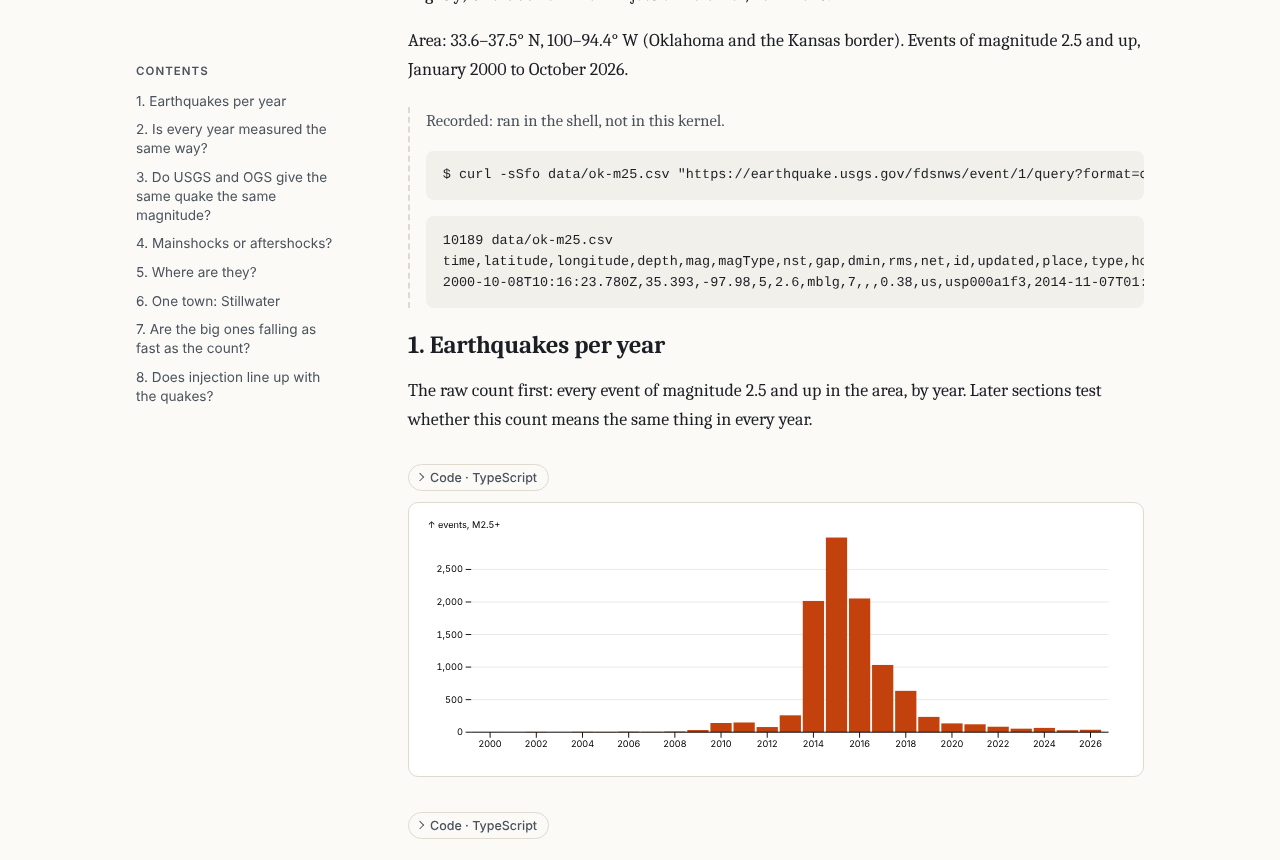
The page has a # heading at the top of the first cell as its title (else the notebook's name), a table of contents from its ## headings, Markdown cells as prose, and charts, images and tables inline. Each code cell's code is folded above its output (code: "shown" shows it, "hidden" leaves it out). In a journal, cells a person wrote are marked, and steps recorded outside the kernel are set apart. It follows the reader's light or dark setting.
It is one file, so it opens anywhere and can be hosted as it is, for example as a Claude artifact or on a static site. It holds only the notebook's content:
cell sources and outputs, and no metadata beyond the kernel's name and who kept the journal: no provenance history, ids or signatures
the server root's absolute path becomes
., the home directory~, and the token[token](when it has 8 characters or more; a shorter one is left as it is), wherever they stand as a whole name (not/home/tommyfor/home/tom), each directory as given and resolved. Withmcp_tokenset, that token too, as[token]. Those are all it replaces: it is not a secret scanner, so an API key, password or environment variable a cell printed goes into the page as it is. Read the page before you share it.no network requests: images are embedded, a Markdown image from elsewhere becomes a link, and HTML outputs run under a policy that loads nothing but their own
data:images and inline stylesno script from the notebook: SVG goes in as an image, HTML output in a frame that can't run scripts, raw HTML in Markdown as text, and an output that needs JavaScript to show (Vega-Lite, widgets) as another entry in its bundle or a note that it was left out
table output (
jupyter.tableandjupyter.sqlin TypeScript notebooks, pandas withdisplay.html.table_schemaon) as a table of its first 100 rows, every value as text, with how many rows there are
The page goes to published/<name>.html beside the notebook, or to out (a path under the root ending in .html). It replaces an earlier published page there, but another file only with overwrite: true. byline sets the line under the title (default: today's date). It runs nothing, so run the notebook first if its outputs may be stale. Not in read-only mode.
Downloading the notebook
The page also carries a copy of the notebook, with a Download notebook button under the title that saves it as <name>.ipynb. The copy keeps to the page's rules, so it is not the file on disk:
- the same replacements (root
., home~, token[token]) in every source, output and attachment, except base64 images - no notebook metadata but the kernelspec and language, so no recorded parameters (
metadata.ganymede.params), signatures or widget state: the notebook runs with its defaults, and opens untrusted - no cell metadata but a raw cell's format and, on a cell an agent wrote, who wrote it (
by,mode), without times or edit history - outputs with every entry of their bundles, also ones the page shows another entry for (such as widgets), but of their metadata only display hints such as an image's width and height
A path the root replaced reads ./data/x.csv, which works when the notebook sits where the root was; one under the home directory reads ~/..., which a kernel may not expand.
The copy is the notebook in the page a second time, so a page with large images is about twice the size. It is left out with code: "hidden", since the copy holds the code, and with download: false; download: true puts it in with hidden code.
The button saves a plain .ipynb in a browser. Hosted as a claude.ai artifact, the page saves through the artifact's downloads capability, which doesn't take .ipynb files, so there it saves a zip holding the notebook; host the page with that capability declared.
The same page comes from ganymede nb publish NOTEBOOK (with --code, --byline, --no-download, --download and -o; it replaces the home directory and the notebook's directory, and writes <name>.html beside the notebook by default, replacing a file there as jupyter nbconvert does) and from GET /nbconvert/html/{path}, JupyterLab's Save and Export Notebook As > HTML, which takes the same options as query parameters (Export).
Changes by others
A person may edit the notebook in JupyterLab or ganymede-ui while the agent works.
notebook_open and notebook_read end with a read mark:
@@read 3f2a9c0d1b7e4a65notebook_read with since: "3f2a9c0d1b7e4a65" (and path, or the mark's own notebook when left out) returns only the cells others added, edited or moved since that read, each as an @@cell block whose head has "change": ["added"], ["edited"], ["moved"] or more than one, and an @@deleted {"id": ...} line per deleted cell. With no changes it says so. Cell sources and types are compared, not outputs or metadata. A cell is moved when it left the longest run of cells that kept their order.
Each MCP connection has one mark per notebook, and it keeps its name. Reading the notebook moves the mark to what was read, and the connection's own edits (cell_add, cell_run, cell_edit, cell_delete, cell_move) move it too, so they are not reported back. An edit moves only what it changed (cell_edit the source, cell_move the place), and a failed edit moves nothing, so someone else's change to the same cell is still reported. Reading with a mark makes it the reading connection's mark for that notebook, replacing any mark the connection had there: the mark it last read with is the one its edits move. So after ganymede mcp starts a new session the agent's mark keeps following its edits. Another connection to the same server can read with the mark, as a hook outside the agent would; that read moves the mark as well, so the agent isn't told the same change twice.
Marks are kept in the server's memory. After a restart, or once more than 4,096 marks are in use, a mark may be unknown: the read then says so and returns the whole notebook with a mark to use next. A mark names one notebook path, so after a rename the old mark is treated the same way.
Learning of changes mid-work, and edits refused
Every tool reply but notebook_read and notebook_open ends with a line like this when others changed a notebook the connection has open and a mark for:
@@changed j.ipynb: cells changed by "Thomas" since your last read (1 edited). Call notebook_read(path: "j.ipynb", since: "3f2a9c0d1b7e4a65") before building on it.So an agent in the middle of its work learns of a person's edit on its next call. The line doesn't move the mark: the read it names does. The journal plugin's PostToolUse hook makes that read for the agent and adds the changes as context right after the reply.
cell_edit, cell_delete and cell_move refuse a cell someone else changed (its source or type) or added since the connection's mark, so an agent can't overwrite an edit it hasn't seen. The error gives the cell as it is now and the notebook_read(since) call that takes the change in; after that read, the agent redoes its edit on top. A refused edit moves no mark. A connection with no mark for the notebook, or one whose mark the server forgot, isn't checked.
A changed cell's head names who last changed it, as "by", when the server saw the change while the notebook was open: a person in JupyterLab or the apps by the name their frontend gives (JupyterLab's user name), or "a person" when it gives none, except that one who comes with a tailnet identity is named by their tailnet login (a tagged device by its tags); another agent by the name its MCP client gave; a change taken in from the file as "another program (the file)"; a change the server made for someone else, such as a kernel through the host API, as "the server". The @@changed line names them too, quoted, and adds "and others" when some of the changes it counts, such as a deletion, have no name. Only a tailnet identity is vouched for: other frontends may give any name, a tailnet login included. Names are cut to 64 characters, without control characters. These are kept in memory: after a restart, cells nobody has changed since carry no "by".
NOTE
Unreleased. Available only from a build of main (HEAD), not in the latest release: naming a person by their tailnet identity.
A Markdown cell that starts with @agent, or @ and the agent's client name or its first part (@claude for claude-code), is a request to the agent when a person added or edited it through the room since the agent's mark: its change includes "request", and the @@changed line says "including a request to you". The same text in a cell another agent or a kernel wrote, or that one of them changed after the person, or one that was already in the file, is not a request, so a notebook can't carry instructions to an agent. A deleted cell that comes back unchanged, as on an undo, keeps the author it had.
notebook_requests lists the requests still open in the notebooks open in the server under the connection's folder (or in one, with path), each as an @@request {"path": ..., "id": ..., "by": ...} line and the cell's text, whose own lines starting @@ are indented by a space. The agent answers one with cell_add(answers: "<id>"): the new cell goes below the request (unless after says otherwise), and the request gets metadata.ganymede.request = {"done": <time>, "answer": <id>, "id": <request id>}, so it is no longer a request, in notebook_requests or in a change report. Both happen in one edit, and neither happens when the id isn't an open request from a person to this agent, or when the person changed the request since the agent's last read. Editing an answered request doesn't reopen it: to ask again, write a new cell. A copy of an answered request (pasted, duplicated or split, so under a new id) is a new request.
A code cell someone else ran since the mark, whose execution count differs from what the mark saw, is reported with "ran" in its change and its new outputs; the @@changed line counts it ("1 ran"), and notebook_read(since) starts "... 0 deleted, 1 ran." The connection's own runs (cell_run, cell_edit with run, notebook_run_all) and its clearing of outputs move its mark once they finish, so a person's run of the same cell that lands just as the agent's finishes is taken as the agent's. Clearing a cell's outputs and count is not a run, nor is a change to its outputs from another cell's run, and after a kernel restart a run that gets the count the mark saw isn't seen. Who ran a cell isn't recorded, so a run alone has no "by".
What the agent sees
Outputs come back as text in nb-cli's @@cell / @@output format: Markdown or plain text, HTML tags stripped, without terminal colors, and tracebacks cut to the last frames. An output over 4,000 characters is written to a file named by its SHA-256 hash in ganymede-mcp-outputs in the Jupyter runtime dir (readable only by you), and the reply gives its path. Images are left out unless the agent's server was started with --images, which sends them as MCP image content. Kernels can't ask for input.
With --images, an SVG output (what Observable Plot, Vega-Lite and most chart libraries draw) that has no PNG or JPEG of its own goes to the agent as a PNG, white background, at most 1,600 pixels on its longer side. The notebook keeps the SVG. Text uses the fonts installed on the server's machine. Images inside the SVG are drawn only from data: URLs; the server reads no files an SVG names. An SVG over 2 MB, or one that can't be drawn, is left out, as before.
Provenance
Cells an agent writes carry metadata.ganymede.agent = {"by": "<client name>", "mode": "executed" | "recorded" | "note", "at": "<time>"}, where the name is the one the MCP client gave when it connected. Scratch runs leave no cells and run with store_history: false, so a kernel that honours it, as ipykernel and cdp-kernel do, doesn't advance its execution count. They share the kernel's state: a variable a scratch run assigns stays defined. Other history is kernel-dependent. With ipykernel, a scratch result still sets _, and Out[N]/_N for the next recorded cell's number N, which keeps the scratch value if that cell has no result. A function a scratch run defines shows as Cell In[N] in tracebacks.
When cell_edit changes a cell's source, the source it replaced is kept in metadata.ganymede.agent.history, oldest first, as {"source": "<old text>", "by": "<client name>", "at": "<time>"}: the replaced text, who replaced it and when. A cell keeps the last 10; an edit that leaves the source as it was adds none. So a finding the agent revised in place still shows what it said before, and a UI can show the revisions. The replaced text is saved in the .ipynb: editing a secret out of a cell with cell_edit leaves it in history until the metadata is cleared.
A kernel's self.edit keeps history the same way, with "by": "kernel".
Options
These apply to a server ganymede mcp starts itself, so each makes it start one even when a shared server is running. For serve --mcp they are config keys.
| Flag | Config key | Effect |
|---|---|---|
--read-only | mcp_read_only | Read notebooks only: no edits, no execution. |
--no-execute | mcp_no_execute | Edit notebooks but run no code. |
--images | mcp_images | Send images in outputs to the model. |
mcp_token | A token /mcp accepts and no other route does; see A token for agents only. | |
--own-server | Start a server even when one is running. | |
--default-kernel | The kernelspec new notebooks start. |
nb-cli
nb-cli is another way in: a command-line tool for agents that talks to ganymede serve over the Jupyter API. It fits agents without MCP, or a person who wants the same commands in a terminal. Agents with nb-cli sets it up with Claude Code. The journaling conventions are the same either way; the plugin's journal skill has them.