Web APIs
NOTE
One of the notebooks the apps' Open Example Notebooks copies, shown with the outputs it saved when ganymede-ui last ran it. The notebook is in ganymede-ui.
Cells have the web platform's fetch, so any API that allows requests from a web page (CORS) is a few lines away. These use public APIs that need no key.
A JSON API: Wikipedia
async function getJson<T = any>(url: string): Promise<T> {
  // jupyter.signal aborts when you interrupt the kernel, so a slow request stops too.
  const response = await fetch(url, { signal: jupyter.signal });
  if (!response.ok) throw new Error(`${response.status} ${response.statusText}: ${url}`);
  return response.json();
}

const page = await getJson("https://en.wikipedia.org/api/rest_v1/page/summary/Ganymede_(moon)");
jupyter.md`### ${page.title}

${page.extract}

[Read more on Wikipedia](${page.content_urls.desktop.page})`;
Ganymede (moon)
Ganymede is a natural satellite of Jupiter and is the largest and most massive moon in the Solar System. Like Saturn's largest moon, Titan, it is larger than the planet Mercury, but has somewhat less surface gravity than Mercury, Io, or Earth's Moon due to its lower density compared to the three. Ganymede orbits Jupiter in roughly seven days and is in a 1:2:4 orbital resonance with the moons Europa and Io, respectively.
Live data: this week's earthquakes
The US Geological Survey publishes earthquakes as GeoJSON, updated every few minutes. Reshape the features into rows, then show them as a table, strongest first.
const quakes = await getJson("https://earthquake.usgs.gov/earthquakes/feed/v1.0/summary/4.5_week.geojson");
type Quake = { place: string; magnitude: number; time: Date; depthKm: number; lon: number; lat: number };
const rows: Quake[] = quakes.features.map((f: any) => ({
  place: f.properties.place ?? "unknown",
  magnitude: f.properties.mag,
  time: new Date(f.properties.time),
  lon: f.geometry.coordinates[0],
  lat: f.geometry.coordinates[1],
  depthKm: f.geometry.coordinates[2],
}));
jupyter.table([...rows].sort((a, b) => b.magnitude - a.magnitude), {
  title: `${rows.length} earthquakes of magnitude 4.5 or more in the past week`,
  columns: ["magnitude", "place", "time", "depthKm"],
});| magnitude number | place string | time datetime | depthKm number |
|---|---|---|---|
| 6.4 | 30 km WSW of Lata, Solomon Islands | 2026-11-09T03:34:59.466Z | 17 |
| 5.8 | 79 km WSW of Changuillo, Peru | 2026-11-13T16:43:02.131Z | 10 |
| 5.8 | 148 km NW of Kavieng, Papua New Guinea | 2026-11-12T22:04:06.729Z | 10 |
| 5.8 | central Mid-Atlantic Ridge | 2026-11-07T23:17:05.477Z | 10 |
| 5.7 | 106 km ENE of Hasaki, Japan | 2026-11-09T04:52:51.519Z | 24.173 |
| 5.5 | 40 km S of Puerto San José, Guatemala | 2026-11-10T14:54:19.977Z | 59.652 |
| 5.5 | 8 km E of Shinshiro, Japan | 2026-11-07T16:04:35.288Z | 37.07 |
| 5.5 | 74 km NE of Hasaki, Japan | 2026-11-07T11:07:43.355Z | 31.748 |
| 5.4 | South Sandwich Islands region | 2026-11-12T03:45:56.644Z | 121.557 |
| 5.4 | Pulau Pulau Tanimbar, Indonesia | 2026-11-10T01:53:24.195Z | 10 |
| … 99 more rows | |||
| 4.5 | 65 km WSW of Masachapa, Nicaragua | 2026-11-07T19:55:10.891Z | 37.054 |
| 4.5 | 11 km ESE of Pedasí, Panama | 2026-11-07T16:01:52.257Z | 10 |
| 4.5 | Fiji region | 2026-11-07T15:05:45.113Z | 571.898 |
| 4.5 | 57 km SW of Ollagüe, Chile | 2026-11-07T10:53:12.299Z | 110.716 |
| 4.5 | central Mid-Atlantic Ridge | 2026-11-07T07:46:31.764Z | 10 |
And on a map, drawn as SVG: longitude and latitude straight to x and y, the circle's size from the magnitude.
const W = 720, H = 360;
const x = (lon: number) => ((lon + 180) / 360) * W;
const y = (lat: number) => ((90 - lat) / 180) * H;
const grid = [];
for (let lon = -180; lon <= 180; lon += 30) grid.push(`<line x1="${x(lon)}" y1="0" x2="${x(lon)}" y2="${H}"/>`);
for (let lat = -90; lat <= 90; lat += 30) grid.push(`<line x1="0" y1="${y(lat)}" x2="${W}" y2="${y(lat)}"/>`);
const dots = rows.map(q =>
  `<circle cx="${x(q.lon).toFixed(1)}" cy="${y(q.lat).toFixed(1)}" r="${(2 ** (q.magnitude - 4)).toFixed(1)}"><title>${q.magnitude} ${q.place}</title></circle>`);
jupyter.svg`<svg xmlns="http://www.w3.org/2000/svg" width="${W}" height="${H}" viewBox="0 0 ${W} ${H}">
  <rect width="${W}" height="${H}" fill="#7a8ca61a"/>
  <g stroke="#88888840">${grid.join("")}</g>
  <g fill="#d9534f" fill-opacity="0.45" stroke="#d9534f">${dots.join("")}</g>
</svg>`;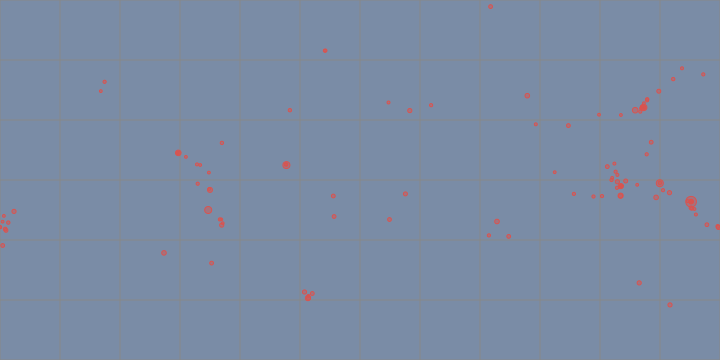
Several requests at once: npm downloads
Promise.all runs requests side by side. The progress line updates in place as each one finishes.
const packages = ["react", "vue", "svelte", "preact", "solid-js", "lit"];
let done = 0;
await jupyter.display(jupyter.md`Fetching 0 of ${packages.length}…`, { display_id: "npm" });
const downloads = await Promise.all(
  packages.map(async name => {
    const d = await getJson(`https://api.npmjs.org/downloads/point/last-week/${name}`);
    done++;
    await jupyter.display(jupyter.md`Fetching ${done} of ${packages.length}…`, { display_id: "npm", update: true });
    return { name, downloads: d.downloads as number };
  }),
);
await jupyter.display(jupyter.md`Fetched ${packages.length} packages.`, { display_id: "npm", update: true });
downloads.sort((a, b) => b.downloads - a.downloads);
const most = downloads[0].downloads;
jupyter.html`<table>${downloads
  .map(d => `<tr><td>${d.name}</td><td style="text-align:right">${d.downloads.toLocaleString("en-US")}</td>
    <td><div style="background:#4f7cac;height:12px;width:${((d.downloads / most) * 260).toFixed(0)}px"></div></td></tr>`)
  .join("")}</table>`;
Fetched 6 packages.
| react | 253,620,155 | |
| preact | 57,388,262 | |
| vue | 24,681,689 | |
| solid-js | 11,301,127 | |
| lit | 9,580,877 | |
| svelte | 9,399,332 |
Errors from the network
A request the server refuses still resolves; check response.ok. A request the network or CORS blocks rejects with a TypeError.
try {
  await getJson("https://api.github.com/repos/tlockney/no-such-repository");
} catch (e) {
  console.log((e as Error).message);
}404 Not Found: https://api.github.com/repos/tlockney/no-such-repositoryYour own API
To try another API, change the URL. If it needs a key, keep the key out of the notebook: on iPhone and iPad, device.ui.prompt can ask for it (see 08 Device).