CLI and configuration
Every command, the server's flags and config file, environment variables, logging, and exit codes. ganymede <command> --help prints the same flags. The guides show them in use: Getting started, JupyterLab and VS Code, and Ganymede's app.
Commands
| Command | Does |
|---|---|
kernelspec list, paths, install <dir>, remove <name> | Find and manage kernelspecs, as jupyter kernelspec |
run | Run code as cells and print the output |
console | An interactive console on a kernel |
execute (exec) | Run notebooks top to bottom, as jupyter execute |
nb clear | Remove a notebook's outputs |
nb publish | Write a notebook as one self-contained HTML page; see Publishing a notebook |
trust | Sign a notebook as trusted, as jupyter trust |
grant | A notebook's own host API grant |
kernel | Start a kernel and print its connection file, as jupyter kernel |
attach | Run code on a running kernel by its connection file |
serve | Serve the Jupyter REST and websocket API |
lab | serve with JupyterLab, opened in the browser |
lab install, list, remove, clean, uninstall | Manage JupyterLab bundles |
lab extension install, list, enable, disable, remove | Manage prebuilt JupyterLab extensions |
ui, ui install, list, remove | serve with ganymede-ui |
mcp, mcp call | Notebook tools for coding agents over MCP on stdio, or one tool call from a script; see Agents over MCP |
info | Versions and the directories in use |
update | Replace the binary with the latest release, as install.sh does; see Update and uninstall |
completions <shell> | Shell completions for bash, zsh, fish, powershell, elvish |
The kernel name fake is a built-in in-process kernel for trying things out.
Flags for every command
| Flag | Effect |
|---|---|
--kernelspec-root <DIR> | Search this kernelspec root (a dir holding kernels/) first. Repeatable. |
-q, --quiet | Discard kernel processes' own stdout and stderr, not cell output. |
-v, --verbose | Report kernel and cell status on stderr; servers log at debug. |
--startup-timeout <SECS> | Seconds for a new kernel to answer; default 60 or config file. |
Server flags
serve, lab and ui take these. Each sets the config file key of the same name in snake case, except where the last column says otherwise.
| Flag | Effect | Config key |
|---|---|---|
--root-dir | Where notebooks and files are served from. Default: the current directory. | |
--ip | Address to listen on. Default 127.0.0.1; a non-loopback address also turns on --allow-remote-access. | |
--port | Default 8888. 0 picks a free port. lab and ui try up to 50 more while it is taken. | |
--token | The auth token. Unset generates one; an empty string disables auth. | |
--allow-remote-access | Accept requests whose Host is not a loopback address or a name in local_hostnames. | |
--allow-origin | An origin, besides the server's own, allowed to use the API and websockets. Repeatable. | allow_origins |
--allow-credentials | Let pages on the --allow-origin origins use the login cookie. Off by default; ignored when * is allowed. See Security. | allow_credentials |
--base-url | A prefix for serving behind a reverse proxy, e.g. /jupyter/. Leading and trailing slashes are added when missing. | |
--cookie-secret-file | Key for signing login cookies. Default: jupyter_cookie_secret in the Jupyter runtime dir. | |
--default-kernel | The kernelspec new notebooks start. Default: the first kernelspec found. | |
--cull-idle-secs | Shut down kernels idle this long with no clients. 0 (the default) never does. | |
--kernel-restart-limit | Restart a kernel that crashes, up to this many times in a row, before leaving it dead. Default 5; 0 never restarts. See Kernel crashes. | kernel_restart_limit |
--checkpoint-dir | Keep checkpoints here instead of .ipynb_checkpoints beside each file. | |
--notary-dir | Where the notebook-signing key and trusted signatures live. Default: the Jupyter data dir. | |
--static-dir | Serve a frontend's files. JupyterLab's bundle is served at /lab, anything else at /. Default: the newest JupyterLab from ganymede lab install. | |
--lab-version | Which installed JupyterLab to serve. | |
--labextensions-path | Another directory of prebuilt JupyterLab extensions, searched first. Repeatable. | labextensions_paths |
--config-dir | Where frontend settings and workspaces are kept. Default: the Jupyter config dir ($JUPYTER_CONFIG_DIR, else ~/.jupyter). | |
--gateway-url, --gateway-token | Run kernels on another server; see Gateway. | |
--kernelspec-root | As above. | kernelspec_roots |
--startup-timeout | As above. | startup_timeout_secs |
-q, --quiet | As above. | quiet |
--mcp | Serve notebook tools for coding agents at /mcp, behind the token; see Agents over MCP. | mcp_enabled |
--config <file> | The config file to read. Default: ganymede.toml in Ganymede's config dir, if it exists; see Config file. | |
--log-level, --log-file | See Logging. |
serve prints the URL, with its token, as the only line on stdout. Security covers what --ip 0.0.0.0 and --token "" expose.
Command flags
Each command's own flags, as its --help lists them. serve takes only the flags for every command and the server flags.
kernelspec list
| Flag | Effect |
|---|---|
--json | JSON in jupyter kernelspec list --json's shape. |
kernelspec install
| Flag | Effect |
|---|---|
--name <NAME> | Name to install as. Defaults to the directory's name. |
--prefix <PREFIX> | Install under PREFIX/share/jupyter instead of the user data dir. |
--replace | Overwrite an existing kernelspec of the same name. |
kernelspec remove
| Flag | Effect |
|---|---|
-f, --force | Do not ask first. Without a terminal on stdin nothing is asked. |
run
| Flag | Effect |
|---|---|
-k, --kernel <KERNEL> | Kernelspec name, or fake. |
--existing [<CONNECTION_FILE>] | Connection file of a running kernel instead of launching one. A bare name such as kernel-<id>.json or <id> is also looked for in the Jupyter runtime dir; with no value, the newest kernel there. |
--cwd <CWD> | Working directory for a launched kernel. |
-f, --file <FILE> | File whose contents are one cell. Repeatable; runs after CODE. |
--json | Print one JSON object per cell (status, count, nbformat outputs) instead of rendering output. A cell that could not finish (a timeout, a dead kernel) gets "status": "incomplete" and an error. The kernel's input requests get an empty reply. |
--timeout <TIMEOUT> | Seconds to wait for each cell. 0 waits forever. Default 0. |
--interrupt-after-ms <MS> | Interrupt each cell after this many milliseconds, to check how a kernel handles an interrupt. |
--keep-going | Keep running cells after one fails. |
console
| Flag | Effect |
|---|---|
-k, --kernel <KERNEL> | Kernelspec name, or fake. |
--existing [<CONNECTION_FILE>] | Connection file of a running kernel instead of launching one. A bare name such as kernel-<id>.json or <id> is also looked for in the Jupyter runtime dir; with no value, the newest kernel there. |
--cwd <CWD> | Working directory for a launched kernel. |
execute
| Flag | Effect |
|---|---|
-o, --output <OUTPUT> | Where to write the result. - is stdout. {notebook_name} is replaced by the input's name without extension. |
--inplace | Overwrite the input. |
-k, --kernel <KERNEL> | Kernelspec name. Defaults to each notebook's metadata.kernelspec.name. |
--allow-errors | Record errors and keep going. |
--allow-error-name <ENAME> | Error names that do not stop execution. Repeatable. |
--force-raise-errors | Stop on every error, overriding the allowances and raises-exception tags. |
--timeout <TIMEOUT> | Seconds per cell. 0 waits forever. Default 0. |
--skip-tag <SKIP_TAG> | Cells with this tag are skipped. Default skip-execution. |
--coalesce-streams | Merge each cell's streams and resolve carriage returns. |
--no-timing | Do not record metadata.execution timings. |
--no-widget-state | Do not save widget state in metadata.widgets. |
-p, --param <NAME=VALUE> | A parameter for the run, NAME=VALUE. Repeatable. VALUE is read as JSON when it parses (7, true, [1,2]), else as a string. The kernel gets them as a JSON object in GANYMEDE_PARAMS. |
--params-file <FILE> | Parameters from a file holding a JSON object; -p wins. |
--results | Print each notebook's named results on stdout, as one JSON line: {"path", "status", "results"}. |
--grant <KEY=PATH> | A host API grant for the notebooks' kernels (docs/host-api.md): read=PATH a path they may read, run=PATH a notebook they may run. Repeatable. A key given replaces the config file's [host] default; PATH is relative to the current directory, "" is all of it. |
kernel
| Flag | Effect |
|---|---|
-k, --kernel <KERNEL> | Kernelspec name, as ganymede kernelspec list shows it. |
--cwd <CWD> | Working directory for the kernel. |
attach
| Flag | Effect |
|---|---|
--timeout <TIMEOUT> | Seconds to wait for each cell. 0 waits forever. Default 60. |
nb clear
| Flag | Effect |
|---|---|
-o, --output <OUTPUT> | Where to write the result. - is stdout. {notebook_name} is replaced by the input's name without extension. |
--inplace | Overwrite the input. |
nb publish
| Flag | Effect |
|---|---|
-o, --output <OUTPUT> | Where to write the page; - is stdout. Default: the notebook's path with .html. |
--code <CODE> | How code shows: folded under a toggle, shown, or hidden. Default folded. |
--byline <BYLINE> | A line under the title, such as the date. |
--no-download | Leave the notebook copy and its Download button out. |
--download | Put the notebook copy in even with --code hidden. |
The page replaces the notebook's directory with . and the home directory with ~, and nothing else: a secret a cell printed (a token, an API key, an environment variable) goes in as it is, so read the page before sharing it. See Publishing a notebook.
grant
| Flag | Effect |
|---|---|
--list | Show the notebook's grant, or every notebook's with no NOTEBOOK. |
--revoke | Remove what follows instead; with nothing after NOTEBOOK, its whole grant. |
--root-dir <DIR> | The server's root directory, which API paths are relative to. Default .. |
trust
| Flag | Effect |
|---|---|
--reset | Delete the trusted signatures and generate a new key. Every notebook becomes untrusted. |
--notary-dir <DIR> | Directory with the key and signatures instead of the Jupyter data dir. |
lab
| Flag | Effect |
|---|---|
--no-browser | Print the URL without opening a browser. |
--no-redirect-file | Open the URL itself, token included, instead of the redirect page in the runtime dir: for snap or Flatpak browsers, which can't read it. jupyter_server's use_redirect_file = False. |
And the server flags.
lab install
| Flag | Effect |
|---|---|
--version <VERSION> | JupyterLab version, exactly. A yanked release is refused. Default 4.6.6. |
--force | Reinstall if this version is already installed. |
--no-default-extensions | Skip the extensions installed with JupyterLab by default: jupyterlab_widgets and anywidget, for widgets. |
--latest-extensions | Install the newest releases of the default extensions instead of the versions this release of Ganymede pins and checks. |
lab extension install
| Flag | Effect |
|---|---|
--force | Reinstall the named packages if they are already installed, and let them replace extensions another package installed. |
--no-deps | Install only the named packages, not the extensions they depend on. |
lab extension list
| Flag | Effect |
|---|---|
--json | Print a JSON array of {"name", "version", "extensions", "required_by"} objects instead. |
lab extension disable
| Flag | Effect |
|---|---|
--config-dir <DIR> | The config dir ganymede serve --config-dir uses, if not the Jupyter config dir. |
lab extension enable
| Flag | Effect |
|---|---|
--config-dir <DIR> | The config dir ganymede serve --config-dir uses, if not the Jupyter config dir. |
lab list
| Flag | Effect |
|---|---|
--json | Print a JSON array of {"version", "dir"} objects instead. |
ui
| Flag | Effect |
|---|---|
--no-browser | Print the URL without opening a browser. |
--no-redirect-file | Open the URL itself, token included, instead of the redirect page in the runtime dir: for snap or Flatpak browsers, which can't read it. jupyter_server's use_redirect_file = False. |
And the server flags.
ui install
| Flag | Effect |
|---|---|
--version <VERSION> | ganymede-ui version, exactly. Default 0.10.1. |
--force | Reinstall if this version is already installed. |
ui list
| Flag | Effect |
|---|---|
--json | Print a JSON array of {"version", "dir"} objects instead. |
mcp
| Flag | Effect |
|---|---|
--root-dir <ROOT_DIR> | The notebooks' directory. Default: the current directory. |
--server <URL> | Use this server (its URL with the base URL, such as http://localhost:8888/) instead of finding one. |
--token <TOKEN> | The token for --server. |
--own-server | Start a server in this process even when one is running. |
--read-only | Read notebooks only: no edits, no execution. Implies --own-server. |
--no-execute | Edit notebooks but run no code. Implies --own-server. |
--images | Send images in outputs to the model. Implies --own-server. |
--default-kernel <NAME> | Kernelspec for new notebooks, on a server this command starts. |
mcp call
| Flag | Effect |
|---|---|
--client <CLIENT> | The client name the server records in provenance. Default ganymede-mcp-call. |
And mcp's flags.
mcp watch
| Flag | Effect |
|---|---|
--client <CLIENT> | The agent's client name: requests may name it (@claude for claude-code). Default claude-code. |
--every <EVERY> | Seconds between checks. Default 2. |
--settle <SETTLE> | Seconds a request (or, with --edits, a notebook's edits) must stay unchanged before it is printed. Default 3. |
--edits | Also print a line when a person's edits to a notebook settle (a spike, off by default). |
And mcp's flags.
info
| Flag | Effect |
|---|---|
--json | Print one JSON object instead. |
update
| Flag | Effect |
|---|---|
--version <X.Y.Z> | Install this release instead of the latest. It may be older. |
--main | Install the latest build of main instead of a release. |
--check | Only say whether a newer release is available. |
--force | Reinstall even when this version is already installed. |
Config file
A TOML file of the keys above, passed with --config. Without it, ganymede.toml in Ganymede's config dir is read if it exists:
| OS | File |
|---|---|
| Linux, macOS | $XDG_CONFIG_HOME/ganymede/ganymede.toml, else ~/.config/ganymede/ganymede.toml |
| Windows | %APPDATA%\ganymede\ganymede.toml |
GANYMEDE_CONFIG_DIR names the directory instead, on any OS: a service can set it to choose its file.
ganymede info prints the path. Flags override the file, and an unknown key is an error, so a misspelt token can't start a server with a random one.
NOTE
Unreleased. Available only from a build of main (HEAD), not in the latest release. The latest release reads ganymede.toml from the Jupyter config dir ($JUPYTER_CONFIG_DIR, else ~/.jupyter). A build of main still reads it there when Ganymede's config dir has none, and warns that it should move. A setup that chose its file with JUPYTER_CONFIG_DIR should set GANYMEDE_CONFIG_DIR to the same directory, or a ganymede.toml in the user's ~/.config/ganymede wins over it.
root_dir = "/srv/notebooks"
port = 9000
default_kernel = "cdp-node"
cull_idle_secs = 3600
allow_origins = ["https://notebooks.example.org"]
Every key, with its default:
# ganymede.toml: every key, set to its default or commented out.
# Flags given on the command line override these.
ip = "127.0.0.1"
port = 8888
# token = "..."                  # unset: a new random token each start; "" turns auth off
root_dir = "."                   # the current directory
# checkpoint_dir = "/path"       # unset: .ipynb_checkpoints beside each file
# notary_dir = "/path"           # unset: the Jupyter data dir
# cookie_secret_file = "/path"   # unset: jupyter_cookie_secret in the runtime dir
# static_dir = "/path"           # unset: the newest JupyterLab from `ganymede lab install`
# lab_version = "4.6.6"
labextensions_paths = []
# config_dir = "/path"           # unset: the Jupyter config dir
base_url = "/"
kernelspec_roots = []
# default_kernel = "cdp-node"    # unset: the first kernelspec found
cull_idle_secs = 0               # 0: never
kernel_restart_limit = 5         # 0: a crashed kernel stays dead
startup_timeout_secs = 60
quiet = false
allow_origins = []
allow_credentials = false
# allow_remote_access = true     # unset: on when ip isn't a loopback address
local_hostnames = ["localhost"]
trust_xheaders = false
max_body_size = 536870912        # 512 MiB
# gateway_url = "https://kernels.example.org"
# gateway_token = "..."
terminals_enabled = true         # false: no /api/terminals
terminal_shell = []              # empty: $SHELL -l, or powershell.exe on Windows
mcp_enabled = false              # true: notebook tools for agents at /mcp
mcp_read_only = false            # /mcp reads notebooks only
mcp_no_execute = false           # /mcp edits notebooks but runs no code
mcp_images = false               # /mcp sends images in outputs to the model
# mcp_token = "..."              # a token only /mcp accepts (see MCP)
crash_reporting = false          # true: send crash reports (see Privacy)
frame_ancestors = "'self'"       # who may frame the server's pages

# Extra response headers for files from a static_dir that
# isn't JupyterLab, none by default (see Static headers). One table per path; "/assets/*" matches
# every path under /assets/:
# [static_headers."/kernel.html"]
# Cross-Origin-Opener-Policy = "same-origin"
# Cross-Origin-Embedder-Policy = "require-corp"

# What cells may read and edit through the host API (see A host API for kernels):
# [host]
# read = [""]                    # API paths; "" is the root, [] only the cell's own notebook
# edit_self = true               # self.add/edit/delete: a notebook edits its own cells
# run = []                       # notebooks a notebook may run (notebooks.run); [""] is all

# Tailnet logins (and with whois, tags) let in without the token, none by
# default (see Security, Tailnet identity):
# [tailscale]
# allow = ["you@example.com"]
# whois = false                  # identify tailnet addresses with `tailscale whois`
# cli = "tailscale"              # the tailscale command for whois

# Language servers for jupyterlab-lsp, none by default. One table each:
# [language_servers.pyright]
# argv = ["pyright-langserver", "--stdio"]
# languages = ["python"]
# mime_types = ["text/x-python"]
These eight keys have no flag. The terminal keys, the MCP keys other than mcp_enabled, static_headers and language_servers have none either; the sections below and Agents over MCP cover them.
| Key | Effect |
|---|---|
local_hostnames | Host names, or IP addresses, accepted besides loopback addresses while remote access is off. Default ["localhost"]. |
trust_xheaders | Trust X-Forwarded-Proto and X-Scheme from a reverse proxy, so login cookies sent over proxied HTTPS are marked Secure. |
max_body_size | Largest request body, in bytes, which caps a notebook's size. A /login form gets at most 64 KiB. Also the largest message a document room takes, and how many bytes of messages a room client may fall behind before it is closed, so lowering it to cap uploads also closes slow room clients sooner. Default 512 MiB. |
crash_reporting | Send crash reports from ganymede to Sentry; see Privacy and crash reporting. Default false. |
[tailscale] allow | Tailnet login names let in without the token when tailscale serve forwards their requests to a loopback port, and with whois tags (tag:agent). Default [], off. See Security. |
[tailscale] whois | Identify requests from tailnet addresses with tailscale whois. Needs ip set to this machine's tailnet address; the server refuses to start otherwise. Default false. See Security. |
[tailscale] cli | The tailscale command whois runs. Default tailscale on PATH. |
frame_ancestors | The CSP sources allowed to frame the server's pages, added to every response as frame-ancestors <sources>. Default 'self', as jupyter_server; add an origin, such as 'self' https://portal.example.com, to embed /lab in that site. See Security. |
NOTE
Unreleased. [tailscale], and IP addresses in local_hostnames, are available only from a build of main (HEAD), not in the latest release.
The host API
[host] read lists the API paths that cell code may read through the host API: notebooks.list, notebooks.read, notebooks.search and notebooks.results. A path covers itself and everything under it, by whole segments, so "journal" covers journal/a.ipynb but not journal-private/. The default, [""], is the whole root; [] leaves each notebook only itself. A path is matched where it leads once symlinks are resolved, so a symlink in a granted folder doesn't reach another.
[host] edit_self, on by default, lets a notebook add, edit and delete its own cells (self.add, self.edit, self.delete), through its document room, so every client sees the change. An edit or delete names the cell's source hash from notebooks.read, and fails with source_mismatch when the cell changed since. false takes the calls away from every notebook that doesn't have its own grant.
[host] run lists the notebooks a notebook may run with notebooks.run, matched as read is; the default, [], is none. A run uses POST /api/notebooks/run's code: a fresh kernel from the notebook's own kernelspec, the parameters in GANYMEDE_PARAMS, and { path, status, results, error? } back, with nothing written. Its kernel gets the intersection of the caller's grant and the run notebook's, and no self.* calls. Runs nest at most 3 deep, a kernel has at most 2 runs in flight (more wait), and cancelling the call shuts the run's kernel down.
A notebook's own grant replaces these defaults for the keys it sets. ganymede grant stores it by the notebook's file id, beside the server's file id database in the Jupyter data dir, so it follows a rename made through the server and goes when the notebook is deleted through it. A notebook deleted outside the server leaves its grant with the path, so a new file saved there gets it; --revoke it first. A running server sees a change on the next call; a notebooks.run keeps the grant it started with until it ends.
ganymede grant journal/index.ipynb read=journal   # reads only journal/ (and itself)
ganymede grant downloaded.ipynb edit_self=false
ganymede grant journal/index.ipynb run=reports   # may run notebooks in reports/
ganymede grant --list                             # every notebook's grant
ganymede grant --revoke journal/index.ipynb read=journal
ganymede grant --revoke downloaded.ipynb          # back to the defaults
read=PATH adds a path to the notebook's own read list, which replaces [host] read for it, so it can narrow the default or widen it; run=PATH does the same for [host] run. Revoking every read path leaves the notebook only itself; --revoke NOTEBOOK read (or run) goes back to the default. --root-dir names the server's root when it isn't the current directory, since grants are kept per root.
Clients such as the apps set the same grants over HTTP, with the server's token:
GET    /api/host/grants/journal/index.ipynb
PUT    /api/host/grants/journal/index.ipynb
{"read": ["journal"], "run": ["reports"]}
DELETE /api/host/grants/journal/index.ipynb
Each answers { path, grant, defaults }: the notebook's own grant ({} when it has none) and [host] from the config, which it replaces key by key. PUT stores the grant in place of the one the notebook had, and {} or DELETE removes it. A grant has only read, edit_self and run; anything else is 400, as are a grant path with .. and a path that isn't a notebook. A missing notebook is 404, and a server whose file ids live only in memory answers 409, since a grant there wouldn't outlive it. A kernel holds no token, so it can't grant itself anything.
Under ganymede execute
ganymede execute answers its kernels' host calls too, with no server running. API paths are relative to the current directory, and a notebook under it is its kernel's own notebook. The defaults are [host] from the config file, with --grant in place of each key it names, and a notebook's own grant from ganymede grant (with the current directory as its root) replaces them key by key, as on a server. --grant read=PATH and --grant run=PATH are repeatable and take paths as ganymede grant does; "" is the whole current directory. An executed notebook's kernel has no self.* calls, whatever its grant, since execute writes the notebook itself when the run ends. A notebooks.run starts its kernel from the kernelspecs serve would use with the same config and --kernelspec-root flags, and shuts it down when it answers. A config file that doesn't parse, like a host that can't start, leaves the run without the host API, with a warning.
ganymede execute index.ipynb --grant read=journal --grant run=reportsStatic headers
static_headers adds response headers to files served from a static_dir that isn't JupyterLab. Keys are paths under base_url; a key ending in * matches every path that starts with the rest of it. Keys match the request path, and also the path as the file is found: percent-decoded, without empty or . segments, and with index.html added to one ending in /. Nothing is added by default. Routes the server answers itself, such as /api/status, never get these headers; a request no route claims, such as an unknown /api/ path, falls through to the static files and can. When several keys set the same header, the last key in sorted order wins, and a configured header replaces one the server set. The frame_ancestors directive is appended to a Content-Security-Policy set here unless it already has a frame-ancestors directive, so a page can set its own.
A page that needs SharedArrayBuffer, such as one hosting a kernel in a web worker, must be cross-origin isolated:
[static_headers."/kernel.html"]
Cross-Origin-Opener-Policy = "same-origin"
Cross-Origin-Embedder-Policy = "require-corp"
An app embedding the server passes the same object in its JSON config ("static_headers": {"/kernel.html": {...}}). The server refuses to start when a key doesn't begin with / or a header name or value isn't valid HTTP.
Kernel crashes
A kernel that exits without being shut down or restarted, through the API or by a client's shutdown_request, is restarted under the same id, in the same directory, as jupyter_server's KernelRestarter does. Its clients see:
- For the request it was running, a reply with
status: errorandename: KernelDied(and anerroroutput, for a cell); for requests queued behind it,status: abortedreplies. Each is followed bystatus: idle, so clients stop waiting for them. status: restarting, which JupyterLab shows as an automatic restart and reconnects on.- The new kernel's own statuses.
A kernel that crashes again within ten seconds of being restarted counts toward kernel_restart_limit (default 5). One crash past the limit, it is reported status: dead and removed, as it always is with the limit set to 0. The kernel's state is lost in a restart, as it is under Jupyter.
Gateway
--gateway-url runs kernels on another Jupyter or Ganymede server while notebooks and files stay local, as jupyter_server --gateway-url does:
ganymede serve --root-dir . \
  --gateway-url https://kernels.example.org --gateway-token "$TOKEN"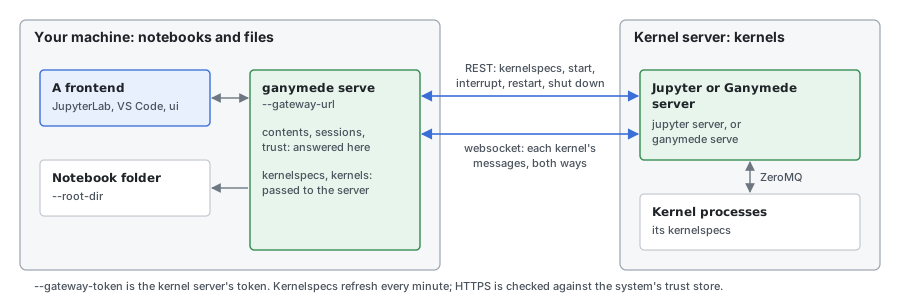
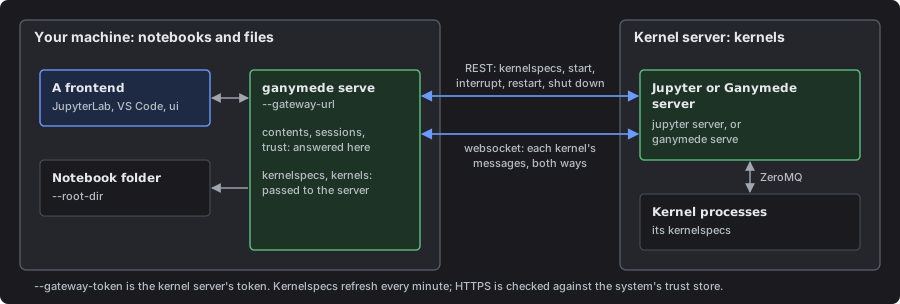
Kernelspecs come from that server (/api/kernelspecs, refreshed every minute); starting, interrupting, restarting and shutting down a kernel go through its REST API, and kernel messages through its websocket. HTTPS is checked against the system's trust store.
The token may be left out when the kernel server is a Ganymede server that lets this machine in by tailnet identity: the gateway marks its requests as a program's (Ganymede-Client).
NOTE
Unreleased. Available only from a build of main (HEAD), not in the latest release: the gateway without a token on a tailnet.
Server info file
While it runs, serve, lab and ui write jpserver-<pid>.json in the Jupyter runtime dir, as jupyter_server does, so tools that look for a running Jupyter server find Ganymede too: jupyter server list lists it, and an agent or script can read the URL and token from it instead of being given them.
{
  "base_url": "/",
  "ganymede_version": "0.11.0",
  "hostname": "127.0.0.1",
  "password": false,
  "pid": 41237,
  "port": 8888,
  "root_dir": "/Users/me/notebooks",
  "secure": false,
  "sock": "",
  "token": "3f9c...",
  "url": "http://127.0.0.1:8888/",
  "version": "2.21.1"
}
The keys are jupyter_server's; version is the jupyter_server version whose API Ganymede matches (as GET /api reports), and ganymede_version tells a client it is Ganymede. token is empty when auth is off. Beside it, jpserver-<pid>-open.html redirects a browser to the server with the token. Both are readable only by you, since they hold the token, and are removed when the server stops; a file left by a server that was killed names a process that is gone, which jupyter server list checks and cleans up. A server embedded in an app writes neither.
From ganymede-ui 0.11.0 on, the Mac app writes jpserver-<pid>.json (no open page) while its MCP setting is on, so ganymede mcp finds it. Its token is the server's mcp_token, which opens only /mcp, so jupyter server list and other readers of the file get a URL the server refuses.
lab and ui open the browser on jpserver-<pid>-open.html, as jupyter_server does, so the token is not in the browser command's arguments. Snap and Flatpak browsers, the default Firefox and Chromium on Ubuntu 22.04 and later, can't read the runtime dir and show an access-denied page; --no-redirect-file opens the URL itself instead, as jupyter_server's use_redirect_file = False does.
Environment variables
| Variable | Effect |
|---|---|
GANYMEDE_CONFIG_DIR | Ganymede's config dir, which holds ganymede.toml; see Config file. |
XDG_CONFIG_HOME | Holds Ganymede's config dir, ganymede/, on Linux and macOS, when GANYMEDE_CONFIG_DIR isn't set. Default ~/.config. |
JUPYTER_CONFIG_DIR | The Jupyter config dir, for JupyterLab's settings and workspaces. Default ~/.jupyter. |
JUPYTER_DATA_DIR | The user Jupyter data dir, where kernelspecs and signatures are. |
JUPYTER_PATH | More data dirs to search for kernelspecs, first. |
JUPYTER_RUNTIME_DIR | Where connection files, the cookie secret and the server info file go. Default: runtime/ in the data dir. |
JUPYTER_GATEWAY_URL, JUPYTER_GATEWAY_AUTH_TOKEN | --gateway-url and --gateway-token when not given. |
GANYMEDE_DATA_DIR | Where lab install and ui install put what they download. |
GANYMEDE_PYPI_URL, GANYMEDE_PYPI_HOSTS | A PyPI mirror, and more hosts allowed to serve wheels; see What a download trusts. |
GANYMEDE_UI_URL | A mirror of ganymede-ui's release downloads. |
GANYMEDE_DOWNLOAD_BASE | A mirror of Ganymede's release downloads, for update and install.sh. |
GANYMEDE_CRASH_REPORTING | 1 turns crash reporting on and 0 off, overriding crash_reporting; see Privacy and crash reporting. |
RUST_LOG | The log filter, when --log-level isn't given. |
HTTPS_PROXY | Used for downloads. |
NOTE
Unreleased. Available only from a build of main (HEAD), not in the latest release: GANYMEDE_CONFIG_DIR and XDG_CONFIG_HOME. The latest release reads ganymede.toml from JUPYTER_CONFIG_DIR.
ganymede info prints every directory in use.
What a kernel gets
A kernel inherits the server's environment, then its kernelspec's env, and gets two more, as under jupyter_server:
| Variable | Value |
|---|---|
JPY_PARENT_PID | The server's process id. |
JPY_SESSION_NAME | For a kernel started for a notebook (a session): the notebook's path on disk, so code can find the notebook it runs in. A session renamed or moved changes it on the kernel's next restart. For a kernel started on its own: the kernel id. |
Parameters and named results
ganymede execute -p and --results make a notebook a program: parameters in, named results out. Neither names a language; any kernel that reads the variable and writes the MIME type takes part.
| What | Format |
|---|---|
GANYMEDE_PARAMS | Set on every kernel execute and POST /api/notebooks/run start: the parameters from -p and --params-file as one JSON object, at most 32,767 bytes, or {} without them, so a kernel never inherits a parent run's. The executed notebook records them in metadata.ganymede.params, and a run without them removes that key. |
application/vnd.ganymede.result+json | A named result: a display_data or execute_result output whose bundle holds { "name": string, "value": JSON }. Add a text/plain entry for frontends that don't know the type. |
application/scrapbook.scrap.json+json, application/scrapbook.scrap.text+json | Python scrapbook's scraps (sb.glue), read as named results from their name and data. |
When a name appears more than once, the last output wins, as in scrapbook. --results prints one JSON line per notebook: {"path", "status": "ok" | "error", "results": {name: value}, "error"?}. The results come only from cells the run executed, so a failed run reports what it published before the failure, never what an earlier run saved in later cells or in cells skipped by tag. A run that stops on a signal, or whose notebook can't be saved, prints its line and ends the command.
POST /api/notebooks/run is the same over HTTP, for clients such as the apps' links and Shortcuts:
POST /api/notebooks/run
{"path": "reports/daily.ipynb", "params": {"day": "2026-11-10"}, "timeout": 600}
It runs the notebook in a fresh kernel from its own kernelspec, with params (a JSON object, optional) in GANYMEDE_PARAMS, and answers when the run ends with the body of one --results line. path is an API path; the notebook is read from its room when one is open, so unsaved edits run. The notebook and its room are never written. timeout is in seconds for the whole run, at most and by default 3600. The run's kernel is listed in /api/kernels while it runs, and shut down when the run ends, times out, or the client disconnects. A missing path, bad params or timeout, or a notebook with no metadata.kernelspec.name, or one this server doesn't have, is 400, and a notebook that can't be read 404, before any kernel starts; after that, a failure is 200 with "status": "error".
Run copies
"save": "copy" keeps the executed notebook. The copy goes under runs/ at the root, in a folder named for the notebook's path without .ipynb, named for the run's start in UTC, and the answer names it as copy:
POST /api/notebooks/run
{"path": "reports/daily.ipynb", "params": {"day": "2026-11-10"}, "save": "copy"}

{"path": "reports/daily.ipynb", "status": "ok", "results": {...},
 "copy": "runs/reports/daily/2026-11-11T193005Z.ipynb"}
The copy holds every cell's outputs and the parameters in metadata.ganymede.params. A failed run is kept too, so the copy shows where it stopped: cells the run didn't reach have no outputs. A second run in the same second gets -2, -3, and so on. The source notebook is unchanged. save defaults to false, which writes nothing; any other value is 400. runs/ is an ordinary folder: browse, read or delete copies through the contents API, and leave it out of a notebook's [host] read grant to keep runs out of its reads and searches. The host API's notebooks.run takes the same save, and keeps a copy only when the calling notebook may read the notebook it runs as well as run it. A read grant on runs/ reads every copy there, whoever made it, so it is a read of each run notebook's source and outputs. A leading dot in a folder or notebook name becomes _ in the copy's folder (.private/nb.ipynb goes to runs/_private/nb/), so copies are never hidden files.
Logging
serve, lab and ui log at info level on stderr; -v raises it to debug, and RUST_LOG overrides both. --log-level (trace, debug, info, warn, error, or Jupyter's WARNING and CRITICAL) overrides all three, and --log-file appends the log to a file instead of stderr. Kernels' own output lines start with [kernel <first 8 of its id>].
Exit status
| Status | Meaning |
|---|---|
| 0 | Success |
| 1 | A cell failed, a kernel timed out or died, or a file or download failed (as jupyter execute) |
| 2 | Usage error: an unknown flag, a missing argument, no code to run |
| 128+N | Stopped by signal N: 130 for Ctrl-C, 143 for SIGTERM, 129 for SIGHUP |