Agents with nb-cli
TIP
For Claude Code, Codex, Cursor and other MCP clients, start with Agents over MCP: ganymede mcp and the ganymede-journal plugin are Ganymede's own way in. This page is for nb-cli, which suits agents without MCP or a person who wants the same commands in a terminal.
A coding agent that explores data usually runs code through its shell and, when asked, writes the work up as a notebook afterwards. That write-up is lossy: code is cleaned up after the fact, outputs are re-run or made up, and dead ends disappear. With Ganymede the agent can work in the notebook from the start. Each step is a cell that ran on the notebook's kernel, so when the session ends the notebook already exists and runs top to bottom.
The agent's tool is nb-cli (nb), a notebook CLI built for agents. It is a client of the Jupyter API, so it works against ganymede serve with no changes on either side. It was tested with nb-cli 0.0.10 on cdp-kernel and ipykernel (validation/nb-cli.sh).
Connect nb-cli
Install nb-cli and start the server in the folder the notebooks go in:
cargo install nb-cli
ganymede serve --root-dir ~/analysis --port 8888
serve prints its URL with the token. Give both to nb-cli:
nb connect --server http://127.0.0.1:8888 --token <token>nb connect with no arguments finds the server by running jupyter server list, which needs Python, so pass --server and --token. Run nb connect and every later nb command from the server's root dir (~/analysis here):
- The connection is kept in
.jupyter/cli.jsonin the current directory only. From another directory,nbfinds no connection and silently works on local files with a local kernel. nb createchecks for an existing notebook in the current directory, not on the server. Run elsewhere, it replaces a server notebook of the same name with an empty one..jupyter/cli.jsonholds the token in plain text; inside a git repository, add.jupyter/to.gitignore.
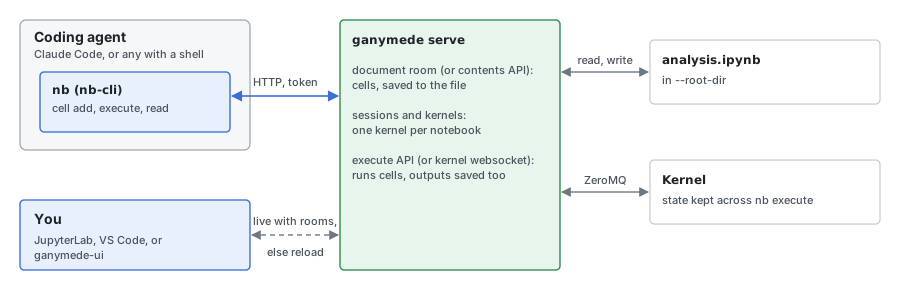
Notebook paths are relative to the server's root dir. Without collaboration rooms on the server, nb-cli edits cells through the contents API (each nb cell add reads and writes the whole notebook) and runs them on a kernel through the server; outputs are saved in the notebook on the server.
Ganymede serves document rooms and jupyter-server-documents' API, and nb-cli uses them: nb connect reports Mode: collaborative. Each nb cell add, update or delete edits the notebook's room, which saves the file about a second later, and nb execute asks the server to run cells (POST /api/kernels/{id}/execute), which writes outputs into the room and the file. A JupyterLab tab with the collaboration extensions, or ganymede-ui, open on the same notebook shows the agent's cells and outputs as they arrive. This path is tested in CI on cdp-kernel and by hand on ipykernel. Two nb-cli 0.0.10 quirks on it:
- nb-cli reads cell counts and indexes such as
--cell-index -1from the file, not the room. Commands run back to back within the room's one-second save delay see the notebook as it was before the last edit, so a secondnb cell addcan land above the first. An agent that runs one command per step is slow enough; a script should check the file between edits, asvalidation/nb-cli.shdoes. nb executeleaves outexecute_resultoutputs (a cell's last expression), because nb-cli reads their integerexecution_countas a float and drops the output (#296). The output is in the notebook, andnb readshows it once the file is saved. Printed output is not affected.
nb create looks up the kernel on local disk, not on the server, and only under VIRTUAL_ENV and the platform's Jupyter data dirs (not JUPYTER_PATH). If the kernelspec is installed only where the server runs, copy it to your user data dir (~/.local/share/jupyter/kernels/ on Linux, ~/Library/Jupyter/kernels/ on macOS), or create the notebook from JupyterLab or ganymede-ui.
Finding the server's URL and token
While it runs, ganymede serve writes jpserver-<pid>.json in the Jupyter runtime dir (see Server info file), so a script or agent can read the URL and token instead of being given them:
cd ~/analysis
dir=$(ganymede info --json | jq -r .runtime_dir)
f=$(jq -s --arg root "$(pwd -P)" \
  'map(select(.ganymede_version and .root_dir == $root)) | .[0] // empty' "$dir"/jpserver-*.json)
if [ -z "$f" ]; then
  echo "no Ganymede server for $(pwd -P)" >&2
else
  nb connect --server "$(jq -r .url <<<"$f")" --token "$(jq -r .token <<<"$f")"
fi
The runtime dir is shared with Jupyter, so the filter picks Ganymede's server for the notebook folder rather than the newest file. The server writes its root dir with symlinks resolved, hence pwd -P. A file left by a server that was killed can still match; jupyter server list, or a failed nb connect, shows it is stale.
Set up Claude Code
nb-cli ships a skill, notebook-cli, that teaches the agent its commands. Install it with npx skills install jupyter-ai-contrib/nb-cli, or copy skills/notebook-cli/ from the nb-cli repository to ~/.claude/skills/notebook-cli/. Then tell the agent to use it, in the project's CLAUDE.md (or AGENTS.md for other agents):
## Notebooks

For .ipynb files, use the notebook-cli skill (the `nb` command). Do not
use the Read or Write tools on .ipynb files. A Ganymede server is
running; `nb status` shows the connection. Run `nb` from the
notebook folder, where `.jupyter/cli.json` is.
An agent that edits the JSON directly can break the file, and its edits don't run, so the notebook's outputs no longer match its code.
Journaling conventions
The conventions that keep the notebook readable for a person and runnable from the top (a title that states the goal, one question per section, a finding after each result, fixing a step in place, recording steps outside the kernel, a clean run at the end) are written once, in the ganymede-journal plugin's journal skill. The skill names the MCP tools; with nb-cli the same conventions hold. Fix a failed cell with nb cell update --cell-index N and run it again rather than appending a copy, record steps outside the kernel as below, and finish with nb execute <notebook> --restart-kernel, then check the notebook.
A session looks like this:
nb create fares.ipynb -k cdp-node
nb cell update fares.ipynb --cell-index 0 --type markdown \
  --source "# Fares by zone\nDo October fares differ by zone? Data: the city's open data portal."
nb cell add fares.ipynb --type markdown --source "## Load\nOctober trips, one row per trip."
nb cell add fares.ipynb --source - <<'CELL'
const res = await fetch("https://data.example.org/trips-2026-10.csv");
const rows = (await res.text()).trim().split("\n").slice(1);
rows.length
CELL
nb execute fares.ipynb --cell-index -1
--source turns escapes such as \n, \t, \" and \\ into the characters they name, which suits a short Markdown cell but changes string literals in code. For code, pass --source - and the cell on stdin, as above.
Steps outside the kernel
Some steps don't run in the kernel: a shell command that downloads or converts a file, a query run elsewhere, a page the agent read. Record them as Markdown with the command in a fenced block and the output it gave, so the notebook says what happened without claiming it ran there:
Downloaded the trips file (run in a shell, not in this notebook):

```sh
curl -sO https://data.example.org/trips-2026-10.csv
wc -l trips-2026-10.csv
```

```
184211 trips-2026-10.csv
```
Check the notebook
nb execute exits 1 and stops at the first cell that raises (unless --allow-errors). To list every cell with an error:
nb search fares.ipynb --with-errorsTo check that the notebook runs top to bottom on a fresh kernel, without nb-cli and without saving anything, run it with Ganymede itself, which exits 1 if a cell fails:
ganymede execute ~/analysis/fares.ipynbWhat doesn't work yet
- No live view without document rooms. In JupyterLab without the collaboration extensions (see Connect nb-cli), the agent's edits reach you only through the file, and JupyterLab doesn't watch it: it notices only when you save, and then asks whether to overwrite. Overwrite replaces the agent's cells with your stale copy. Reload first (File, Reload Notebook from Disk), and don't edit a notebook while the agent works in it. Ganymede serves the rooms; JupyterLab needs the collaboration extensions (
ganymede lab extension install jupyter-docprovider jupyter-collaboration-ui) to use them. - A cell timeout doesn't stop the cell.
nb executewaits 30 seconds per cell by default (-tsets it; raise it for slow downloads). On a timeout it gives up before saving, so outputs of cells that already ran in that call are lost, and the kernel keeps running the cell, so the next call waits for it. Interrupt the kernel from a frontend or restart it with--restart-kernel. - No input. nb-cli runs cells with stdin off, so code that asks for input fails, as under nbclient.
- Colour codes in TypeScript output. cdp-kernel formats
text/plainresults as Deno does, with ANSI colour codes, and nb-cli passes them through to the agent. - Gateway mode picks any kernel.
nb execute --gateway URL --gateway-token Tkeeps the notebook on local disk and runs it on a kernel of the server. Without--kernel-idit takes the first kernel listed, whatever its language; pass the id.